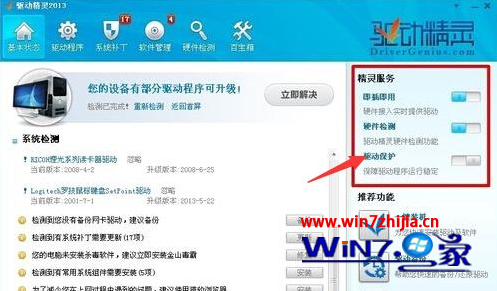
安裝驅動精靈後,系統服務中會常駐 DriverGenius PNP Service,且工作管理員無法結束該程序。此為驅動精靈的「驅動保護」功能所致,關閉該開關並重新安裝即可移除服務。
DriverGenius PNP Service
不同版本驅動精靈介面略有差異,「驅動保護」開關通常在「設定」、「工具箱」或主畫面側邊欄中,仔細尋找即可。
Win7 刪除桌面右鍵「個人化」選項:註冊表移除 Gadgets 殼擴充
Win7 旗艦版 64 位與 32 位系統的四大核心差異詳解
Win7 修改硬碟分割區磁碟機代號標籤:登錄表法解決 XP 升級後無法重命名
Win7 IE8 無法登入網銀解決:修正登錄銀行驅動路徑
Win7 關閉機殼電源鍵防止誤觸關機
簡單修復 Windows 7 資源管理器「收藏夾」無法展開故障:註冊表新增 IsShortcut 字串值
Win7 Word 2010頻繁無法開啟?停用COM增益集與信任中心修復啟動異常
Win7 內建數學輸入面板:手寫公式識別插入 Word,告別公式編輯器煩惱