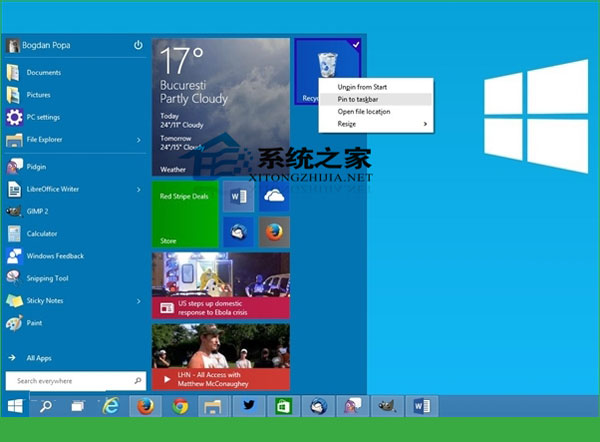
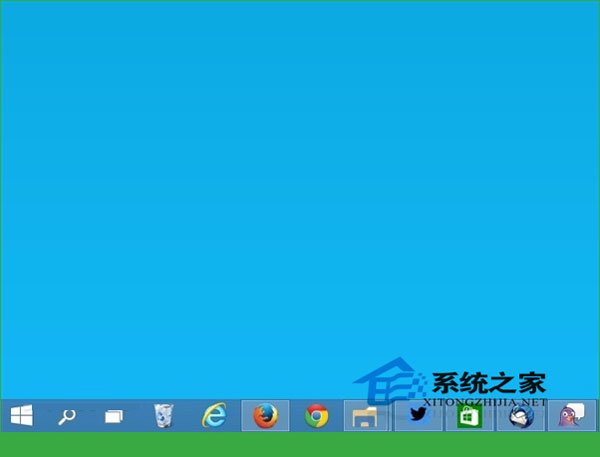
Win10 允許將回收筒釘在工作列,但需繞道開始畫面:
雖無法直接拖拽檔案到工作列回收筒圖示刪除(預覽版限制),但固定後視覺上更醒目,正式版預計支援拖拽刪除。
如何取得 Win10 系統體驗指數
Win10 設定隱藏共享資料夾完整圖文教程
Win10 UAC 視窗「是」選項呈灰色無法點擊怎麼辦?
Win10 使用 Windows Defender 建立離線殺毒 USB/光碟
Win10 一鍵關閉所有程式:建立捷徑執行 taskkill 指令
Win10 TH2 更新失敗、卡住?10 招官方建議一次看
Win10 解決 Microsoft 管理主控台停止運作完整修復指南
Win10 任務列「位置」圖示:功能解析與隱私權管理完整指南