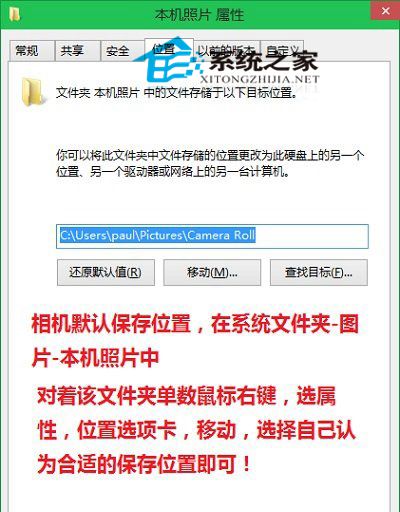
Win10 內建相機應用預設存檔於:
C:\Users\<使用者名稱>\Pictures\Camera Roll
平板/二合一筆電常用相機拍照,變更至大容量磁碟避免 C 槽壓力。
Win10 虛擬桌面完整操作教學:多桌面切換、視窗管理技巧
Win10 更換桌面主題:右鍵桌面→個人化→選擇內建/下載新主題→套用
Win10 啟用半透明鎖定畫面與登入介面:登錄表修改 Threshold 值為 1
Windows 10 開機直接進入「開始畫面」而非桌面?任務列屬性一鍵切換
Win10 9926 平板模式手動切換方法與介面變化完整分析
Win10 關機變重開機?關閉「快速啟動」解決電源管理衝突
Win10 預覽版無法直接解除安裝?只能重裝舊系統覆蓋
Win10 右鍵「新增」選單消失?登錄修正 New 項目 GUID 恢復建立資料夾功能