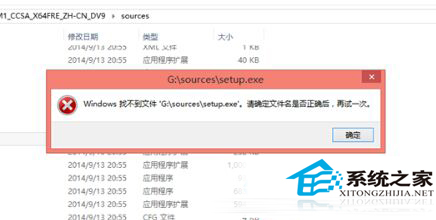
嘗試在 32 位元 Win10 系統下直接執行 64 位元安裝程式 setup.exe,會跳出「Windows 找不到檔案 'G:\sources\setup.exe'」錯誤。根本原因:32 位元作業系統無法載入 64 位元安裝程式。
32 位元系統無法原地升級為 64 位元,必須重新安裝。一般家用電腦 32 位元已足夠,若記憶體超過 4GB 建議改用 64 位元版本。
Win10 休眠檔案 (hiberfil.sys) 壓縮清理:powercfg 指令調整大小
Win10 開始選單使用技巧:強大搜尋、自訂磚塊、資料夾分組
Win10 Logs 資料夾是什麼?能不能刪除?系統日誌功能與清理建議
Win10 Edge 瀏覽器預設傳送瀏覽歷史給微軟?兩步關閉 Cortana 與頁面預測保護隱私
Win10 預覽版 10586 桌面右下角「測試模式」水印怎麼關閉?一行指令解決
Win10 限制遠程協助僅允許 Vista 及以上系統連接的設定教程
Win10 找回 Windows 體驗指數評分:透過 shell:Games 與 winsat formal 指令重跑分數