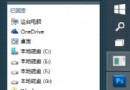
Win10 偶發桌面圖示、工作列全消失,實為 explorer.exe 意外終止。解決:
explorer.exe
explorer
explorer.exe 管理 Windows 圖形殼(桌面、檔案管理),遇此情況重啟即可。記住此法,關鍵時刻救急。
Win10 儲存空間功能:多顆硬碟組建儲存池、鏡像/同位檢查保護資料不遺失
升級 Win10 後沒聲音?四大主流解決方案一次看懂
Windows 10 設定純色桌面背景:極簡風格一鍵套用
Win10 啟用 Aero Glass 透明特效完整教學(僅限 64 位預覽版)
Win10 Surface Pro 4 連不上 WiFi?六大官方解決方案
Win10 設定應用程式存取行事曆權限:設定→隱私權→行事曆,逐項開關保護隱私
Windows 10 無法啟動 League of Legends (LOL) 解決方案彙總
Win 10 32 位玩 DNF 藍畫面錯誤解決方案:三大主流代碼逐一破解