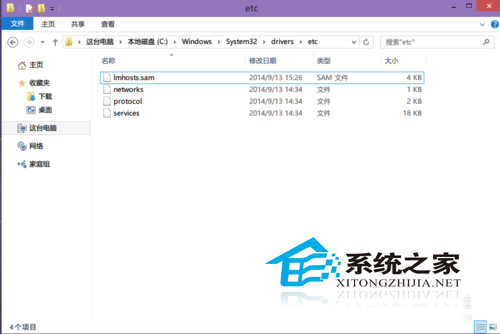
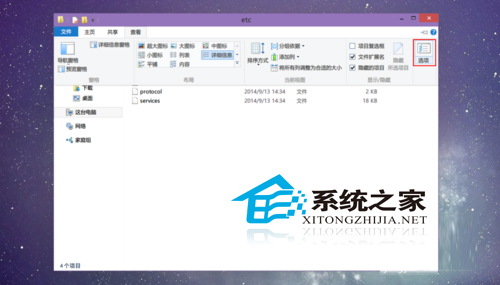
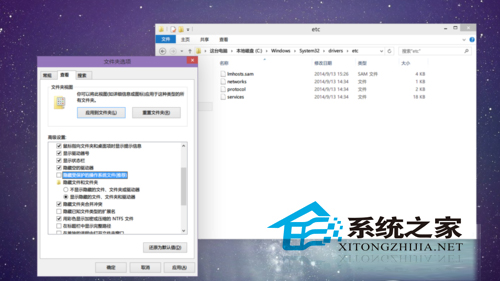
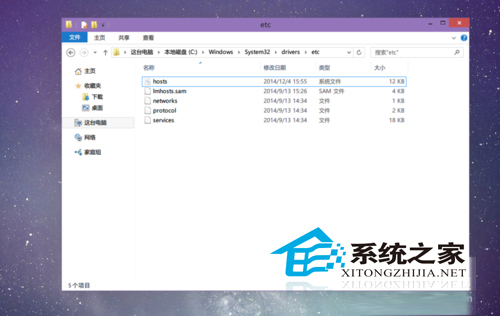
Windows 的 hosts 檔案可加速網域解析。Windows 10 顯示隱藏檔仍看不到 hosts 怎麼辦?
C:\Windows\System32\drivers\etc
修改 hosts 可解決網頁緩慢,更多妙用參考《講解 Windows 系統 Hosts 檔案的妙用》。
Win10 快速開啟計算機兩大絕招:Win+R 指令與右鍵選單整合
校園網頻寬不足如何升級 Win10?離線安裝包法避開網速瓶頸
Win 10 執行舊遊戲出錯?三招解決:相容模式、啟用 DirectPlay、登錄表調高鍵盤速度
Win10 提示「電腦記憶體不足」實為顯示記憶體不足?BIOS 調整共享顯存解決
Win10 如何降級安裝 IE10?透過「檢視已安裝的更新」移除 IE11 即可自動回歸 IE10
Win10 自訂開始選單磚塊背景與圖示:軟媒魔方 + XML 清單檔實作
Win10 9926 應用商店「您的國家/地區無法使用」:改區域為美國或用綠色圖示商店
Win10 檔案歷程記錄排除特定資料夾備份:減少備份空間與時間