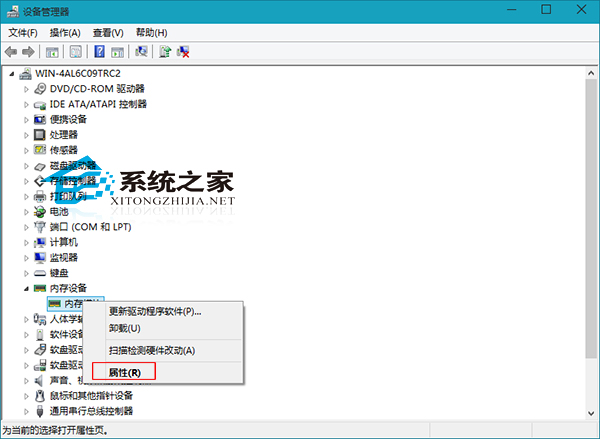
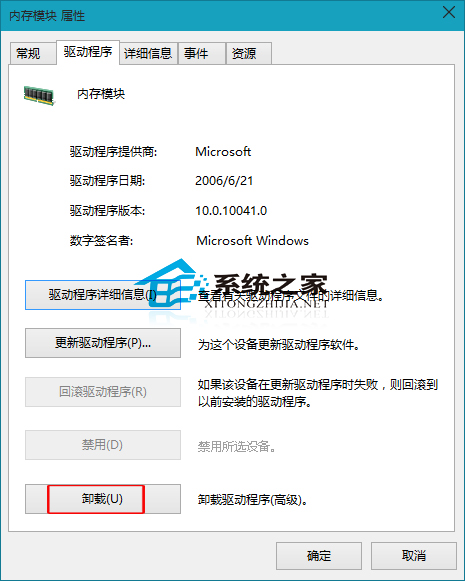
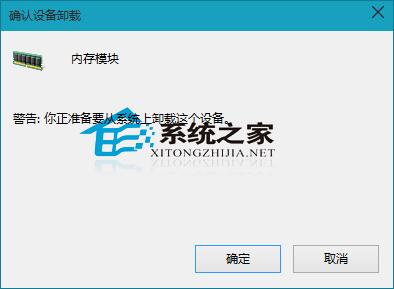
遇到硬體故障(如記憶體無法辨識、不相容),如何在 Windows 10 解除安裝記憶體驅動程式?
一般遇到記憶體問題,可嘗試重新安裝或更新驅動程式解決。
Windows 10 重新命名本機磁碟機代號的簡單操作
Chrome暫不接入Win10通知中心:技術架構不匹配
Windows 10 移除桌面捷徑小箭頭批次檔一鍵操作教學
Win10 修改預設列印機:控制台裝置與印表機中設定常用印表機
Win10 使用 DISM 指令查詢可升級版本:一鍵顯示目標版本資訊
Win10 筆記本插電不充電?六大排查方向:充電功能、原廠電源、電源計畫、電量保護、電池壽命、接觸不良
Windows 10 忘記 PIN 碼如何重置?Microsoft 帳戶驗證後重新設定
Win10 IE 瀏覽器彈出「離線工作」提示:調整連線設定解除