Windows XP Windows 7 Windows 2003 Windows Vista Windows 綜合教學 Linux 系統教學
Windows 10 Windows 8 Windows 2008 Windows NT Windows Server 電腦軟體教學

Windows 10 移除檔案總管導覽窗格中的 OneDrive 圖示

編輯:Win10 系統應用技巧

不使用 OneDrive 但檔案總管左側導覽窗格仍顯示 OneDrive 圖示,可透過登錄編輯器隱藏:

隱藏步驟

  1. 按 Win + R 輸入 regedit 開啟登錄編輯器。
  2. 導航至:
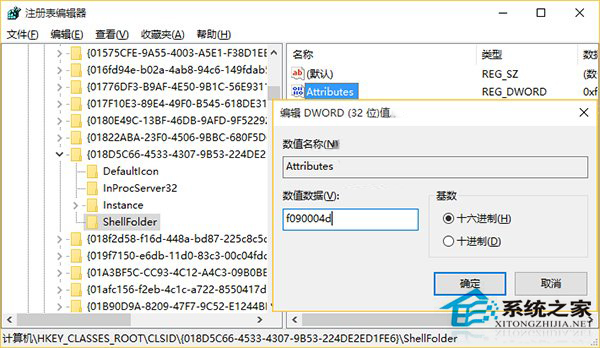
    HKEY_CLASSES_ROOT\CLSID\{018D5C66-4533-4307-9B53-224DE2ED1FE6}\ShellFolder
  3. 在右側找到 Attributes 值,雙擊將數值資料改為 f090004d(十六進位)。
  4. 按確定,重新啟動檔案總管(或重新登入/重新啟動電腦),OneDrive 圖示即從導覽窗格消失。

登錄編輯器修改 Attributes

此修改僅隱藏導覽窗格圖示,不影響 OneDrive 同步功能與系統托盤圖示。若要徹底移除 OneDrive,請使用命令 %SystemRoot%\SysWOW64\OneDriveSetup.exe /uninstall(64 位元系統)。

Copyright © Windows教程網 All Rights Reserved