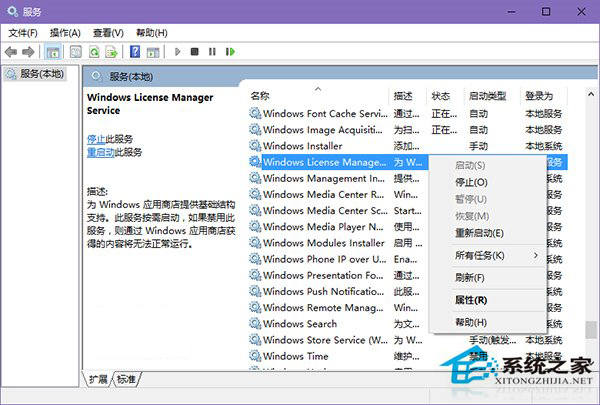
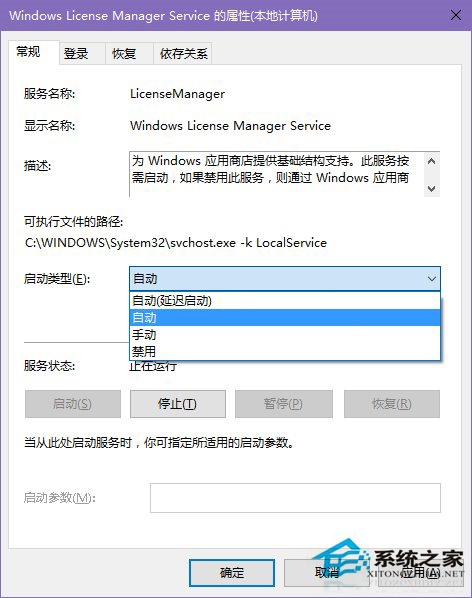
Win10 應用商店啟動即閃退、內建 UWP 應用 (照片、郵件、日曆等) 無法開啟,核心原因多為 Windows License Manager Service (WLMS) 服務未啟動。服務描述:「為 Windows 應用商店提供基礎結構支援。按需啟動,若停用則透過應用商店取得的內容無法正常運行。」
services.msc
啟用後重新開啟應用商店與 UWP 應用即可恢復正常。此服務常被「優化」腳本/第三方工具誤停用,建議檢查並設為自動。
Win10 開啟/關閉硬碟寫入快取功能完整教學
Win10 筆電螢幕亮度調整方法:鍵盤快速鍵、設定、控制台、行動中心多種管道
Win10 難救頹勢:宏碁 Q2 營收創近 10 年新低
微軟停止支持多款Lumia應用 全力推進Win10 Mobile
Windows 10 鏡像安裝失敗 0x80080005-0x90016?msiexec 修復或乾淨啟動
Windows 10 實現夜間模式/深色模式快速切換(PowerShell 腳本)
如何徹底移除騰訊 Win10 升級助手彈窗?三種清除等級由輕到重
Win10 多項系統功能 (計算機、Hyper-V 等) 無法開啟?修復 Application Information 服務