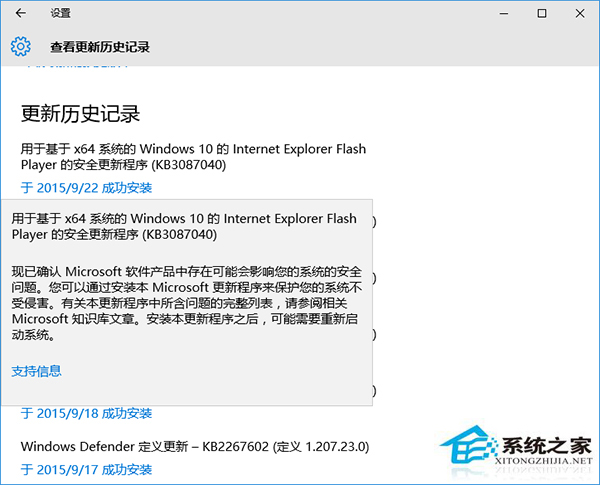
KB3087040 修復 Flash Player 嚴重安全漏洞 (更新至 19.0.0.185),Win10 自動安裝頻繁報錯 0x80004005 (未指定錯誤)。Win7/8.1 未見類似回報。
windows10.0-kb3087040-x64_*.msu
windows10.0-kb3087040-x86_*.msu
Flash 安全漏洞風險極高 (遠端執行代碼),建議立即手動修補,勿等待微軟修復推送機制。微軟後續可能重新發布修正版更新。
Windows 10 寫字板在哪裡?兩種快速開啟方法
Windows 10 開啟登錄編輯器最快捷方法
Win10 照片磚 (相片應用程式) 刪除磚中圖片教學:垃圾桶圖示選取刪除
Win10 設定 Edge 為預設瀏覽器:設定 → 系統 → 預設應用程式 → 網頁瀏覽器
Win10 進入系統保護設定:建立還原點、開啟/關閉系統還原功能
Win10 Edge 瀏覽器將預設搜尋引擎改為 Bing?設定→進階設定→變更搜尋引擎→選 Bing 設為預設
Win10 顯示檔案副檔名:檔案總管「檢視」勾選或資料夾選項取消隱藏兩法速成
Win10 Windows Hello 指紋辨識設定全流程:錄製、登入、失敗提示動態變化,安全與便利並重