Windows 內建寫字板處理文字編輯很實用。Windows 10 寫字板在哪?如何開啟?
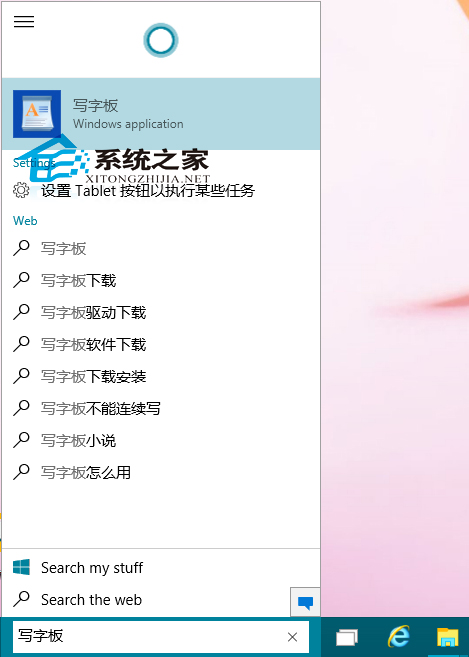
點擊 Cortana 搜尋框,輸入「寫字板」,點擊最上方搜尋結果開啟。
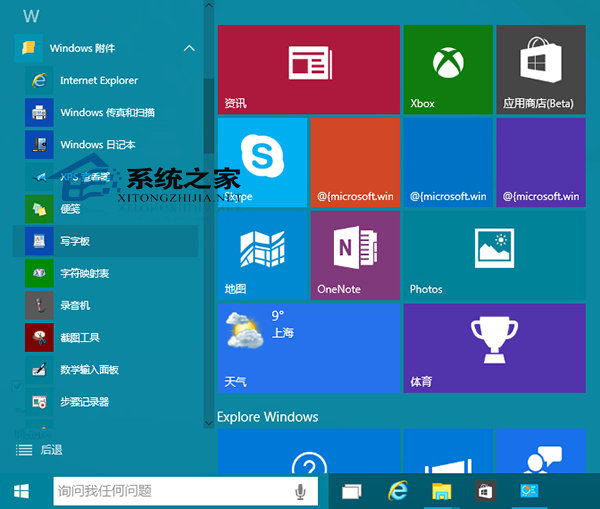
「開始選單」→「所有應用程式」→「Windows 附屬應用程式」中開啟。
寫字板使用頻率雖不如計算機、畫圖高,但關鍵時刻仍能派上大用場。
惠普 Pavilion x2 (2015) 實測:10.1 吋二合一平板,Atom Z3736F、Type-C、Win10 升級體驗
Win10 筆記本電源圖標消失?裝置管理員重啟電池驅動找回
Win10 Svchost.exe 佔滿網速?那是 Windows Update 在下載補丁
Windows 10 開始選單、小娜打不開?三種臨時修復法快速恢復
Win10《英雄聯盟》遊戲大廳白畫面怎麼解決?修改 DNS 為 114.114.114.114
如何從桌面浮水印判斷 Win10 是否正版授權?兩種水印一眼識別
Win 10 CMD 命令提示字元全新功能:支援 Ctrl+C/V/A/F、視窗最大化、文字自動換行
Windows 10 刪除多餘網路連線設定檔(網路 2、網路 3...)