Windows XP Windows 7 Windows 2003 Windows Vista Windows 綜合教學 Linux 系統教學
Windows 10 Windows 8 Windows 2008 Windows NT Windows Server 電腦軟體教學

Win10 更新 Flash Player 出現 0x80070002 錯誤?清除更新快取與檢查核心服務

編輯:Win10 系統應用技巧

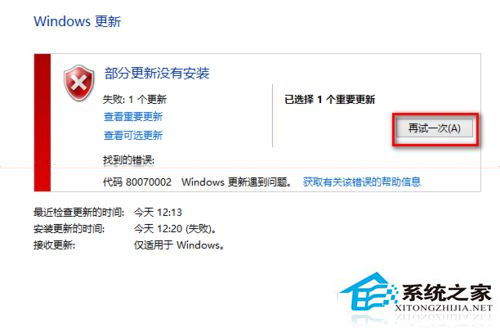
Win10 更新 Adobe Flash Player (透過 Windows Update 推送) 失敗,錯誤代碼 0x80070002 (系統找不到指定檔案),通常因更新快取損壞或核心服務未啟動。

方案一:清除 Windows Update 快取 (最有效)

  1. 管理員 CMD/PowerShell 執行:
    net stop wuauserv
  2. 刪除資料夾內所有檔案:
    C:\Windows\SoftwareDistribution\Download
    C:\Windows\SoftwareDistribution\DataStore
  3. 重新啟動服務:
    net start wuauserv
  4. 重新「檢查更新」。

方案二:確認核心服務啟動狀態

Win+R → services.msc 確認下列服務「啟動類型」為「自動」或「手動」且狀態為「正在執行」:
  • Background Intelligent Transfer Service (BITS)
  • Windows Update (wuauserv)
  • Cryptographic Services
  • Windows Installer
  • Software Licensing Service

錯誤 0x80070002

此兩方案同樣適用於其他更新失敗 (如 KB3081455) 出現 0x80070002 的情況。若仍失敗,嘗試執行 sfc /scannow 修復系統檔案。

Copyright © Windows教程網 All Rights Reserved