Windows 10 執行磁碟檢查後,結果不會像舊版本那樣直接彈出視窗,需透過「事件檢視器」查看詳細日誌。具體操作如下:
查看步驟
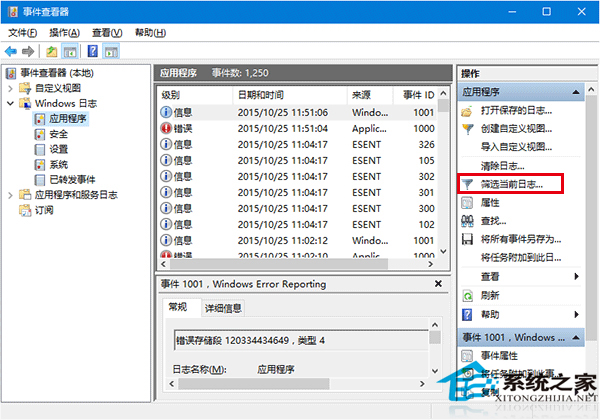
- 按 Win + S 搜尋 「事件檢視器」 並開啟(或右鍵「開始」按鈕選擇「事件檢視器」)。
- 左側樹狀目錄依序展開:「Windows 記錄」 → 「應用程式」。
- 在右側「動作」欄點擊 「篩選目前的記錄」。
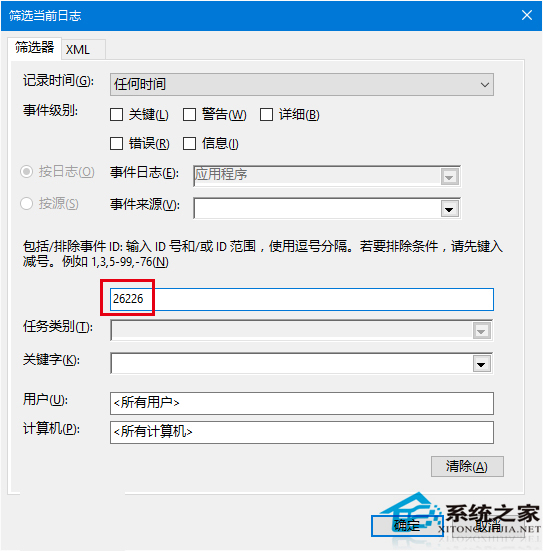
- 在「事件來源」下拉選單選擇 Wininit,或直接在 「事件 ID」 輸入
26226,點擊「確定」。
- 中間窗格將列出所有磁碟檢查事件。雙擊任一事件,在「一般」或「詳細資料」頁籤即可查看完整掃描結果(如發現錯誤、修復狀況、耗時等)。
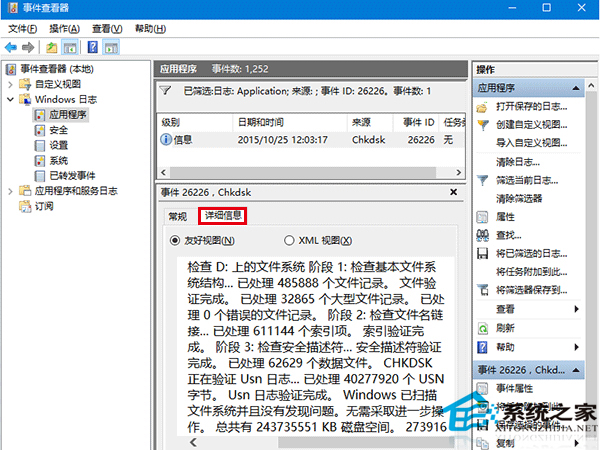
注意: 事件 ID 26226 僅適用於 Windows 8.1 / 10。Windows 7 請使用事件 ID 1001(來源為 Winlogon)。