照片檢視器預設白底,透過註冊表可改為任意顏色(如黑底 ff000000)。
regedit,導航:HKEY_CURRENT_USER\Software\Microsoft\Windows Photo Viewer\ViewerBackgroundColor。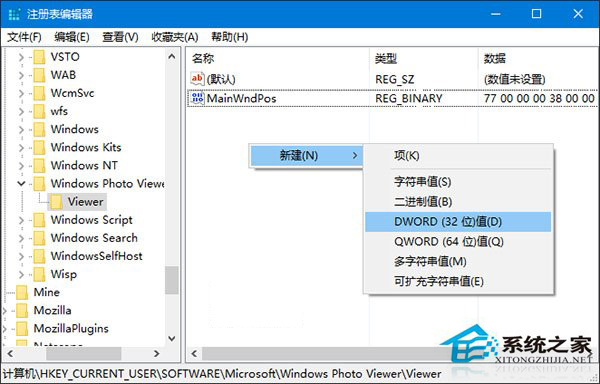
ff + 六位十六進位色碼(如黑色 ff000000、紅色 ffff0000)。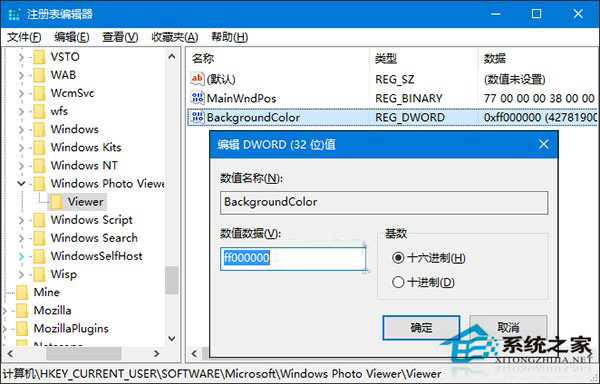

可自由嘗試各種顏色代碼。
Win10 Edge 瀏覽器啟動報錯「explorer.exe 類別未註冊」?啟動 User Manager 服務修復 App 容器權限
Win10 Edge 瀏覽器歷史記錄管理:單條刪除、按域名清理、一鍵清空
小白一鍵重裝系統 Win10 版:兼容性強、同步官方更新、支援 UEFI/GPT、新手零門檻
Win10 如何檢查所有驅動程式是否已安裝?裝置管理員看黃色驚嘆號
Windows 10 忘記 PIN 碼如何重置?Microsoft 帳戶驗證後重新設定
Win10 玩《植物大戰殭屍》閃退怎麼辦?全螢幕改視窗模式 + 關閉高 DPI 縮放