Windows XP Windows 7 Windows 2003 Windows Vista Windows 綜合教學 Linux 系統教學
Windows 10 Windows 8 Windows 2008 Windows NT Windows Server 電腦軟體教學

Win10 啟用 Ctrl+Alt+Del 組合鍵解鎖增強安全性

編輯:Win10 系統應用技巧

預設滑鼠/鍵盤任意鍵即可喚醒鎖定畫面,有遠端解鎖風險。啟用「安全注意序列」(Ctrl+Alt+Del) 可強制實體操作解鎖,防止遠端破解。

設定步驟

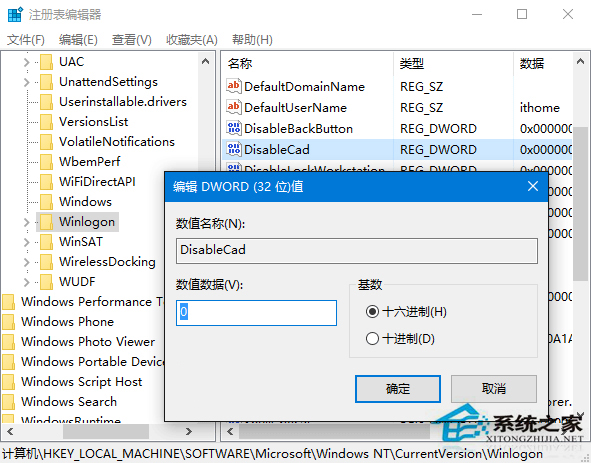
  1. Win+R → regedit,定位:
    HKEY_LOCAL_MACHINE\SOFTWARE\Microsoft\Windows NT\CurrentVersion\Winlogon
  2. 找 DisableCad(無則新建 DWORD),數值設 0。
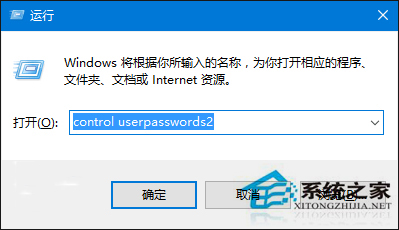
  3. Win+R → control userpasswords2 開啟「使用者帳戶」。
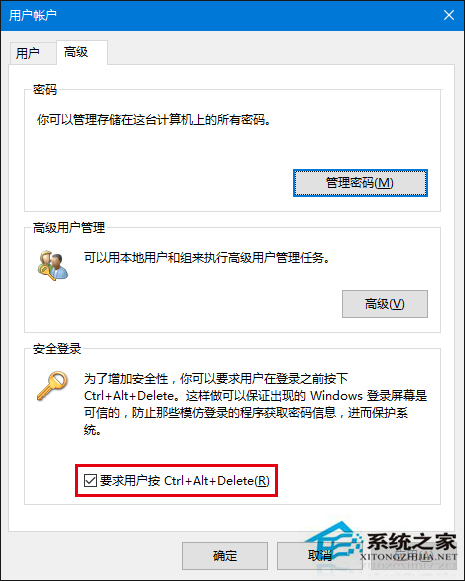
  4. 「進階」標籤 → 勾選 「要求使用者按 Ctrl+Alt+Delete」,確定。

之後鎖定畫面需實體按下 Ctrl+Alt+Del 才能進入登入介面,大幅提升安全性。

Copyright © Windows教程網 All Rights Reserved