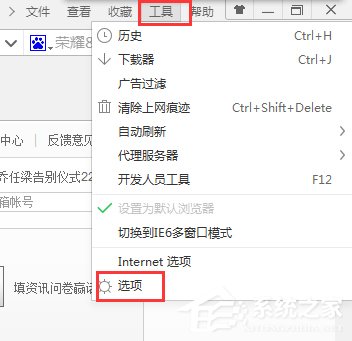
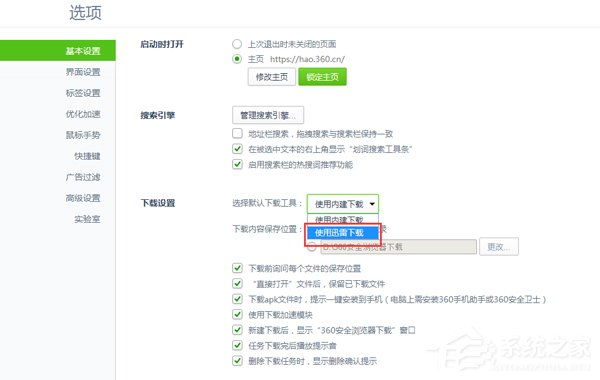
Windows 10 使用 360 瀏覽器下載速度慢,可將迅雷設為預設下載工具加速。
設定後點選下載連結將自動喚起迅雷下載,大幅提升速度。
Win10 緊急重新開機功能怎麼用?Ctrl+Alt+Del + Ctrl+電源鍵避免強制關機傷硬體
Win10 快速查看圖片解析度與尺寸:兩種內建方法詳解
Windows 10 禁止「敘述者」開機自動啟動:輕鬆使用設定一鍵關閉
Win7/Win8.1 升級 Win10 正式版常見問題大全:未收到推送、錯誤代碼、驅動衝突、應用閃退彙總
Win10 更新驅動程式導致裝置異常?使用「復原驅動程式」功能快速回滾
Windows 10 關閉自動維護功能教學:降低 CPU 與磁碟占用
Win10 關閉所有硬體驅動自動更新:裝置安裝設定改為「從不安裝」
Win10 將回收站釘選到「快速存取」側邊欄技巧(詳細版)