Windows XP Windows 7 Windows 2003 Windows Vista Windows 綜合教學 Linux 系統教學
Windows 10 Windows 8 Windows 2008 Windows NT Windows Server 電腦軟體教學

Edge 瀏覽器看影片綠屏?更新顯卡驅動、關閉硬體加速即可修復

編輯:Win10 系統應用技巧

Windows 10 內建的 Edge 瀏覽器介面清爽無廣告,深受用戶喜愛。但部分用戶反映播放網頁影片時出現綠屏、花屏現象。這通常源於顯卡驅動相容性不佳,或 Flash Player 硬體加速與系統衝突。針對這兩大主因,提供以下解決方案。

方案一:更新顯卡驅動程式

Win10 早期驅動相容性尚待優化,顯卡驅動是影片異常的高發因素。請優先透過 Windows Update 更新,若無效請前往顯示晶片官網(NVIDIA/AMD/Intel)下載最新 WHQL 認證驅動安裝。
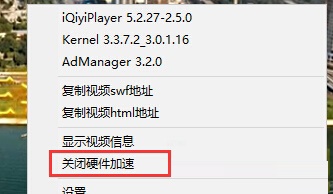

方案二:關閉 Flash Player 硬體加速

  1. 在綠屏影片上右鍵點選「設定」。
  2. 取消勾選「啟用硬體加速」。
  3. 同視窗中將「本地儲存」調整為「無限制」,確認儲存。

Flash Player 設定-取消硬體加速
Flash Player 本地儲存設定

此法不僅適用 Win10,其他 Windows 版本同樣有效。掌握技巧,告別綠屏困擾,暢享高清影音。

Copyright © Windows教程網 All Rights Reserved