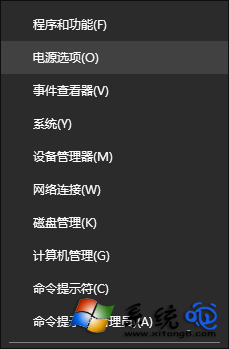
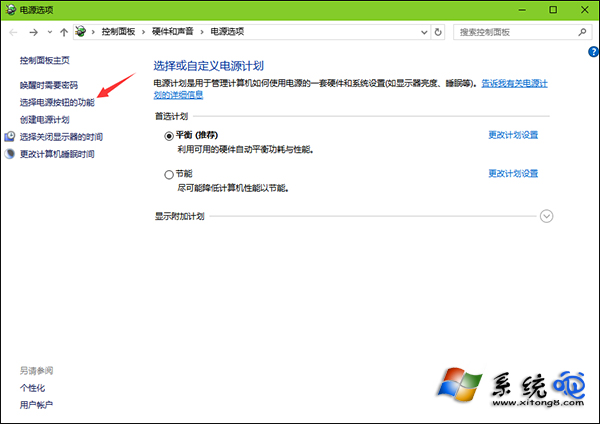
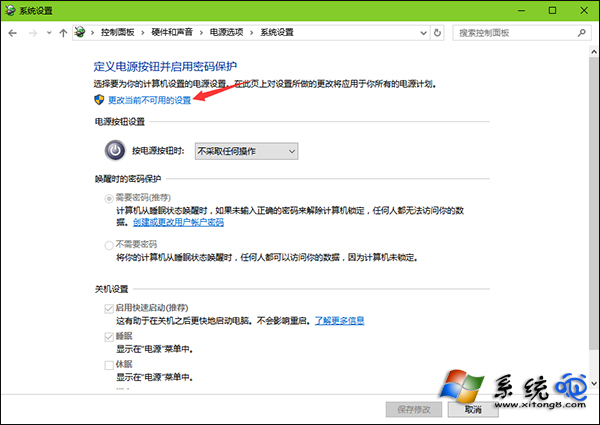
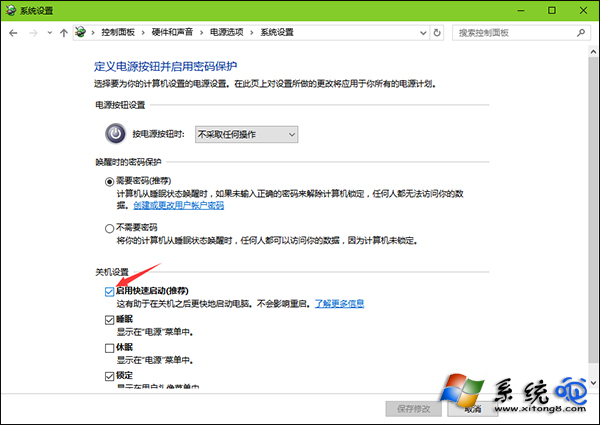
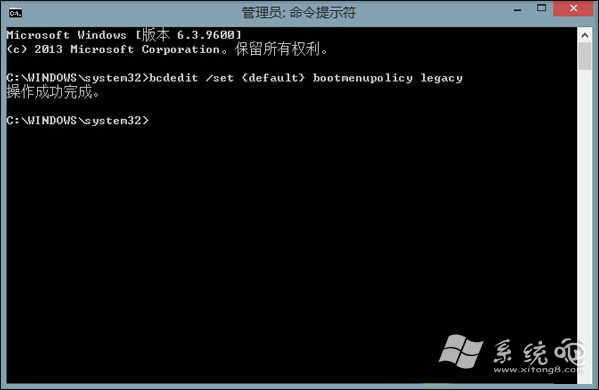
Win10/8 預設啟用快速啟動,導致無法以傳統 F8 進入安全模式。需關閉快速啟動並執行 bcdedit 設定傳統啟動原則,恢復 F8 功能。
bcdedit
bcdedit /set {default} bootmenupolicy legacy
重開機後,開機過程中連按 F8 即可進入傳統安全模式選單。若需恢復快速啟動,執行 bcdedit /set {default} bootmenupolicy standard 並重新勾選快速啟動。
bcdedit /set {default} bootmenupolicy standard
Win10 Edge 隱身模式在哪?其實叫 InPrivate 視窗
Win10 瀏覽器暫存資料夾無法更改位置?登錄表修改 User Shell Folders Cache 鍵值解決
Windows 10 IE 瀏覽器如何管理附加元件(增益集)?網際網路選項一鍵進入
為何 Windows 10 被稱為「最後一版 Windows」?解析 Windows as a Service 策略
Win10 縮短桌面應用啟動延遲:登錄修改讓開機更迅速
Win10 無法輸入中文?三大解決方案修復輸入法故障
Windows 10 內建播放器 (WMP) 最小化後無聲音 Bug 暫時對策:勿最小化視窗、改調整大小
Win10 解決「USB 連接埠電源浪湧」提示:關閉通知設定與硬體端排查指南