Windows XP Windows 7 Windows 2003 Windows Vista Windows 綜合教學 Linux 系統教學
Windows 10 Windows 8 Windows 2008 Windows NT Windows Server 電腦軟體教學

Win10 開始選單應用程式全部消失?PowerShell 重新註冊 AppX 套件修復

編輯:Windows 10 系統介紹

開始選單釘選的應用程式突然全數消失,執行 PowerShell 指令重新註冊所有 AppX 套件即可恢復。

修復指令

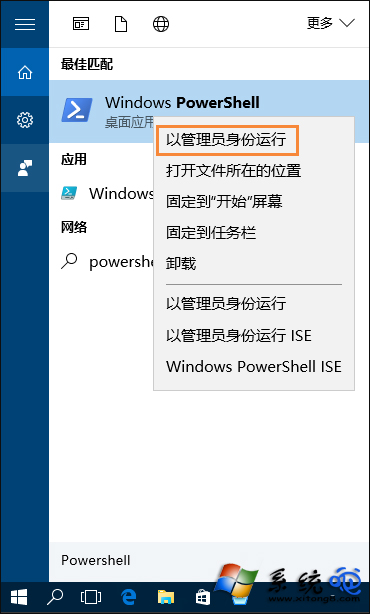
  1. 按 Win+S 搜尋 PowerShell,右鍵選擇「以系統管理員身分執行」。
  2. 輸入以下指令並按 Enter:
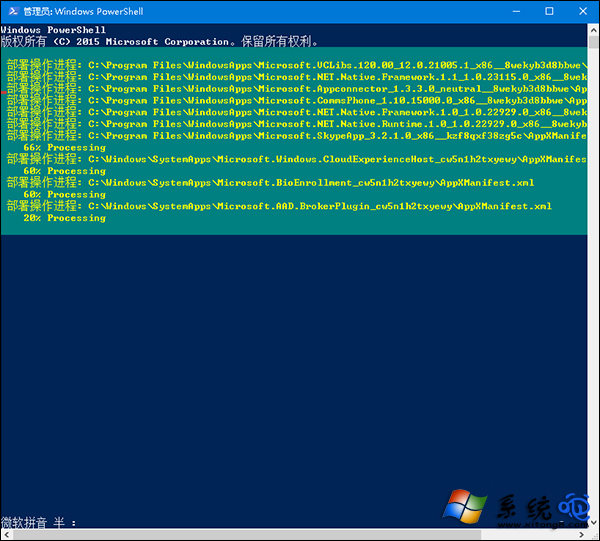
    Get-AppxPackage -AllUsers | Foreach {Add-AppxPackage -DisableDevelopmentMode -Register "$($_.InstallLocation)\AppXManifest.xml"}
  3. 等待執行完成(可能需數分鐘),重新開機後開始選單應用程式圖示即恢復。

以管理員開啟 PowerShell

執行重新註冊指令

此指令會掃描所有使用者的 AppX 套件並重新註冊資訊清單,修復開始選單圖示消失問題。

Copyright © Windows教程網 All Rights Reserved