Windows XP Windows 7 Windows 2003 Windows Vista Windows 綜合教學 Linux 系統教學
Windows 10 Windows 8 Windows 2008 Windows NT Windows Server 電腦軟體教學

Win10 使用支付寶付款提示「憑證不可用」怎麼解決?群組原則修改 User Agent 模擬 IE8 相容模式

編輯:Windows 10 系統介紹

Windows 10 使用支付寶網頁版付款時,若出現「數位憑證錯誤/憑證不可用」,主因是 Edge/新版 IE 不支援支付寶舊版安全控件。透過群組原則修改瀏覽器 User Agent 字串模擬 IE8,即可相容舊控件完成付款。

設定步驟(專業版/企業版/教育版)

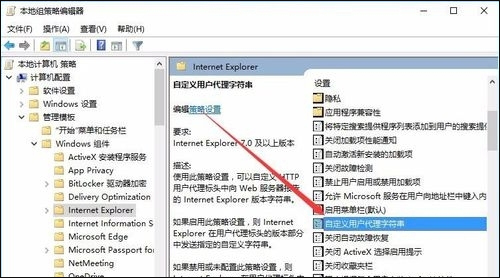
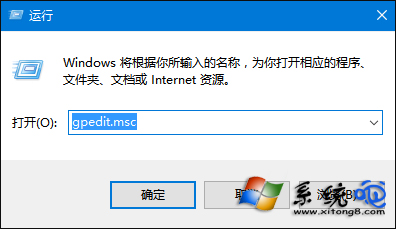
  1. 按 Win + R 輸入 gpedit.msc 開啟本機群組原則編輯器。
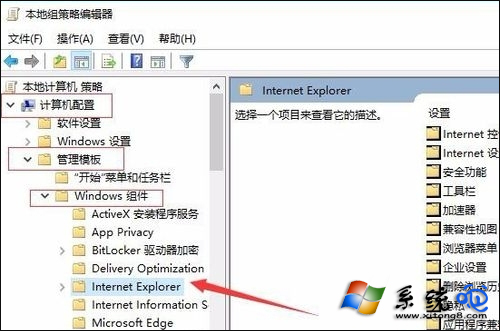
  2. 依序展開:
    「電腦設定」 → 「系統管理範本」 → 「Windows 元件」 → 「Internet Explorer」。
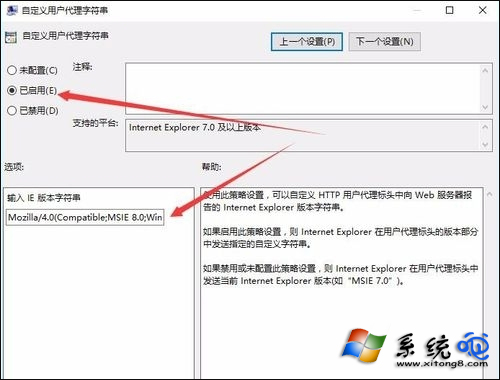
  3. 右側雙擊「自訂使用者代理字串」 → 選擇「已啟用」。
  4. 輸入 User Agent 字串:
    Mozilla/4.0 (compatible; MSIE 8.0; Windows NT 6.1; Trident/4.0)
  5. 點擊「確定」退出,重新開機生效。

重開機前建議先將欲購買商品加入收藏,重開機後即可正常使用支付寶付款。此法透過模擬 IE8 環境相容舊版 ActiveX 控件。

Copyright © Windows教程網 All Rights Reserved