Windows XP Windows 7 Windows 2003 Windows Vista Windows 綜合教學 Linux 系統教學
Windows 10 Windows 8 Windows 2008 Windows NT Windows Server 電腦軟體教學

Windows 10 Build 15002 綠畫面死機(GSOD)是什麼?內測版專屬區分機制

編輯:Windows 10 系統介紹

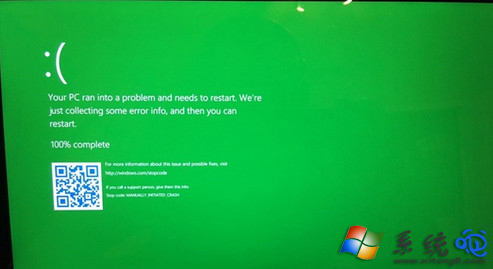
Windows 10 Insider Preview Build 15002 引入綠畫面死機(GSOD, Green Screen of Death),取代傳統藍畫面(BSOD)。微軟內測主管 Dona Sarkar 表示:綠畫面專供 Windows Insider 內測版 使用,目的在於讓工程師快速區分來自內測用戶與正式版用戶的錯誤報告。正式版(含 Creators Update 正式版)仍維持經典藍畫面。
背景知識

  • 藍畫面(BSOD)起源於 1993 年 Windows NT 3.1。
  • Windows 8 加入悲傷表情符號,後續加入 QR Code 連結支援頁面。
  • 綠畫面僅出現在內測版本,正式版用戶不會遇到。
綠畫面死機畫面

遇到綠畫面怎麼辦?同藍畫面處理:記下錯誤代碼、重開機、檢查驅動更新、執行 sfc /scannow、DISM /Online /Cleanup-Image /RestoreHealth、查看事件檢視器、分析 Minidump。內測用戶請透過「意見回饋」App 回報。

Copyright © Windows教程網 All Rights Reserved