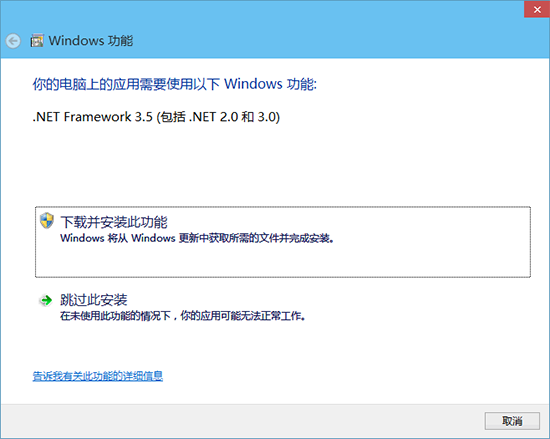
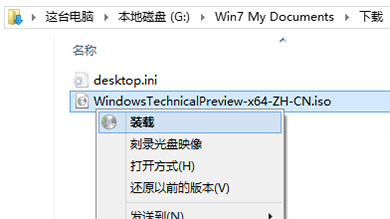
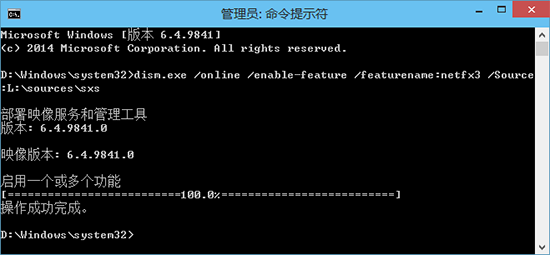
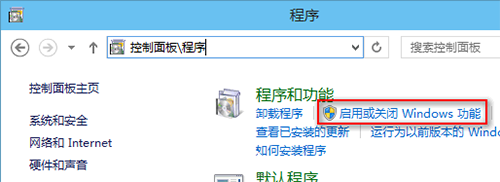
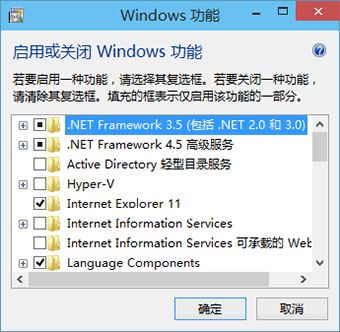
安裝軟體提示缺 .NET 3.5,線上下載極慢。離線部署法:
dism.exe /online /enable-feature /featurename:netfx3 /Source:L:\sources\sxs
比「Windows 功能」介面勾選安裝(仍需線下)快百倍,必備離線部署技巧。
Win10 快速啟動功能無法開啟?群組原則修復讓它重新生效
Win10 啟用 OneDrive 同步檔案完整流程:選擇資料夾、設定隨選存取
學會這 10 招充分體驗 Windows 10:自訂開始功能表、Cortana、平板模式、虛擬桌面、Edge、動作中心...
Windows 10 雙顯卡切換失效解決方案:驅動更新與手動指定獨顯
Win10 開機自動彈出 OneDrive 登入視窗怎麼關閉?停用同步設定解決煩擾
Windows 10 啟動失敗錯誤 0xC004C003 解決方案:KMS 啟用與跳過金鑰安裝
Windows 10 Build 10130 內建音樂應用程式新增夜間模式 (深色主題)
Win10 RS2 14905 更新內容與已知問題完整彙整