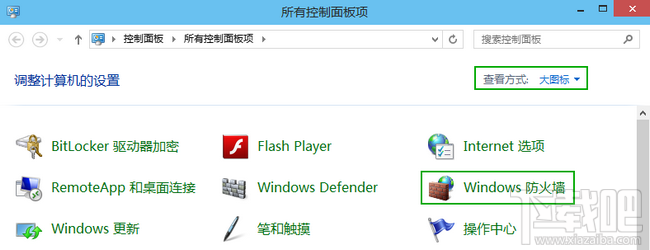
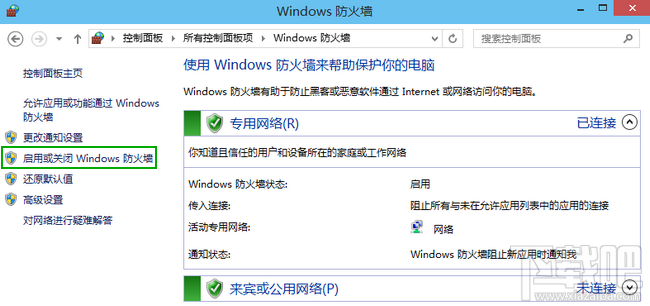
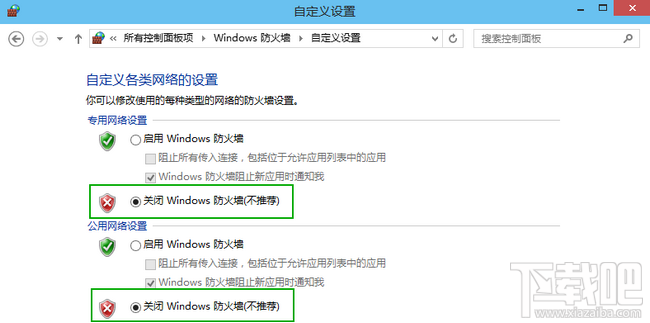
特定軟體/遊戲與防火牆衝突時需暫時關閉:
⚠ 提醒:關閉防火牆暴露系統風險,建議排除問題後立即重新開啟,或改用「允許應用程式通過防火牆」精準放行。
Win 10 如何正確顯示 iPhone 7 拍攝照片?安裝 DCI-P3 設定檔並啟用 Windows 照片檢視器
Win10 TH2 更新卡在 44%?移除 SD 卡即可繼續安裝
安裝 Win10 前必知 9 大常識:金鑰、過期、配置、升級保留、虛擬機
Win10 開機卡在登入畫面?安全模式卸載近期軟體/驅動或重置系統
Win10 一鍵切換電源計劃註冊表完整碼:桌面右鍵選單新增平衡/高效能/省電秒切選單
Windows 10 關閉/隱藏/停用小娜 (Cortana) 完整步驟:隱私設定停用語音墨跡收集
Win10 登出帳號在哪?開始選單點使用者名稱即見
Win10 開始選單跳出「嚴重錯誤」?設定 User Manager 服務為自動修復