regedit
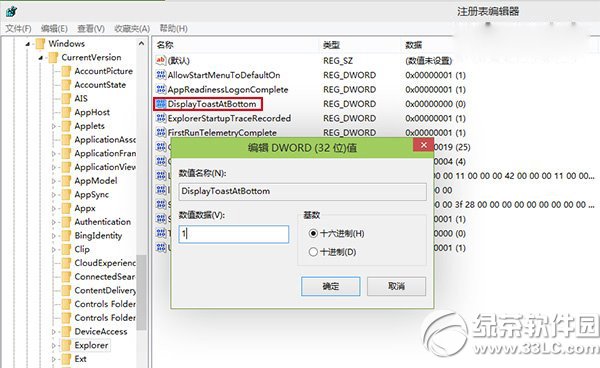
HKEY_CURRENT_USER\Software\Microsoft\Windows\CurrentVersion\Explorer
DisplayToastAtBottom
1
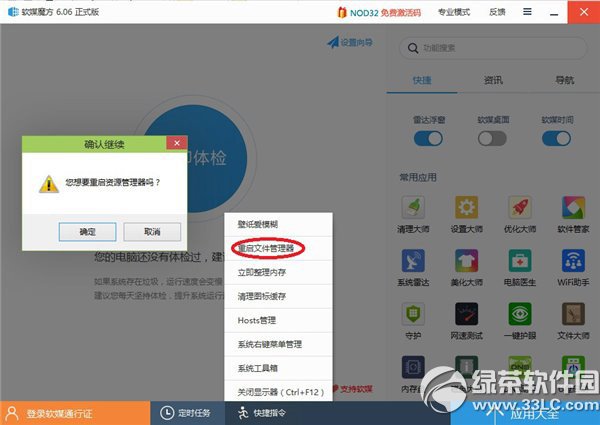
將 DisplayToastAtBottom 改回 0,重啟 explorer.exe 即恢復右上角。
0
Windows 10 修改 Win+E 開啟「這台電腦」而非「主頁」:註冊表教學
Win10 出現「DNS 伺服器未回應」?三步驟快速修復網路連線
Win10 升級報錯 0x80070002 解決方案:清理舊碟分區、禁用非微軟服務
Win 10 藍畫面 0xAB 問題怎麼辦?微軟釋出 KB3019269 修補程式
Win10 好不好用?核心新功能體驗:虛擬桌面、強化分螢幕、全新開始選單、跨裝置統一
Windows 10 找回傳統控制台:註冊表修改右鍵選單一鍵呼叫經典設定介面
Win10 小馬 OEM8 激活工具使用教學
Windows 10 隱藏程式視窗背景執行:VBScript WShell.Run 參數 0 實作教學