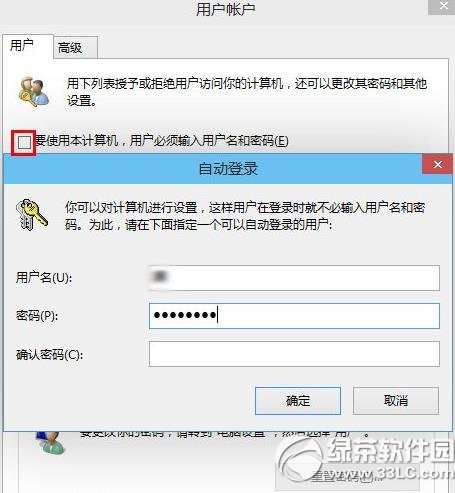
control userpasswords2
亦可使用「軟媒魔方」的「設定大師」在「系統帳戶」中更快速設定。
Win10 磁碟檢查結果怎麼看?事件檢視器篩選事件 ID 26226 查看詳細日誌
Win10 Build 10149 內建完整 Android 子系統 (Project Astoria)
Windows 10 十大實用新功能深度解析:從原生列印 PDF 到 Cortana 自然語言搜尋
Windows 7 如何設定鬧鐘?使用「工作排程器」建立定時提醒
Win10 雙顯卡切換設定:指定遊戲使用獨顯
Win10 設定 3D 文字螢幕保護程式:自訂字型、文字、滾動效果與色彩
Windows 10 關閉/開啟動畫特效完整教學:兩種方法提升操作流暢度
IE11 快取資料夾怎麼移到別顆硬碟?釋放 C 盤空間完整步驟