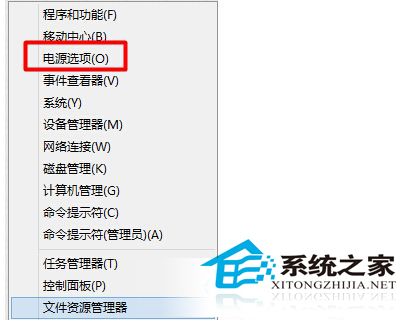
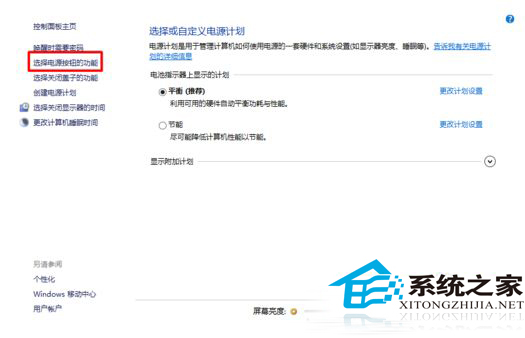
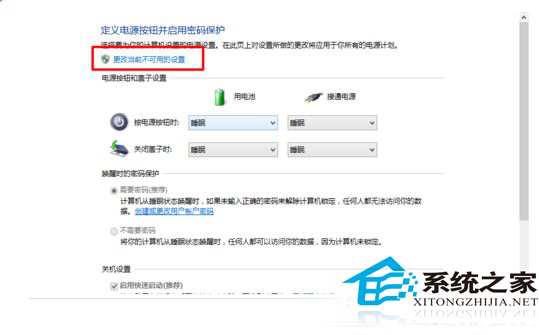
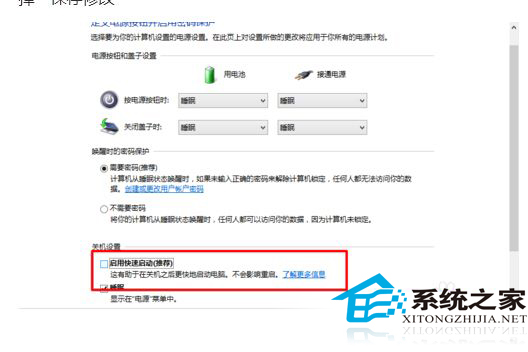
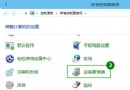
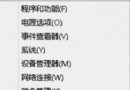
Windows 10 的「快速啟動」融合了休眠與冷開機技術,雖能縮短開機時間,但自 Windows 8 時代起便有用戶回報可能導致硬碟故障。預覽版系統更不穩定,為求穩妥,建議暫時關閉此功能。
同樣的問題在 Win8 時期就已存在,測試階段更易觸發未知錯誤。關閉快速啟動雖會稍微拉長開機時間,卻能有效降低硬碟損壞風險,是體驗預覽版時的明智之舉。
Win10 雙顯示卡切換設定教學(針對遊戲效能優化)
Windows 10 虛擬鍵盤新功能:文字預測與中文輸入優化
Windows 10 七大優勢解析:Cortana、Windows Hello、觸控、Ink、硬體擴充、支援生態、遊戲天堂
Win10 解決磁碟使用率 100% 問題:移除 Intel 快速儲存技術驅動程式
Win10 控制台在哪?兩種快速開啟方法
Win10 重新註冊/重裝所有內建應用程式(PowerShell 指令)
Win10 Continuum 模式 (平板模式) 體驗:全螢幕應用、一鍵切換、適合觸控
Windows 10 QQ 群檔案轉存為永久檔案教學:點擊三角形符號選擇轉存