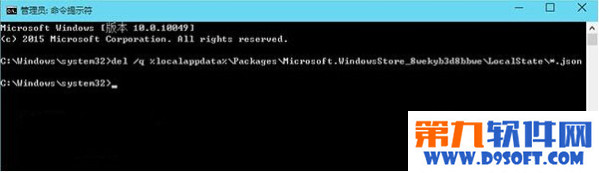
Win10 應用商店打不開,以管理員權限執行指令刪除快取檔即可解決。
del /q %localappdata%\Packages\Microsoft.WindowsStore_8wekyb3d8bbwe\LocalState\*.json
原理為清除損壞的本地快取 JSON 檔案,讓商店重新建立乾淨快取。
Win10 鬧鐘與時鐘應用設定提醒完整教學
Win10 創建寬帶連接 (PPPoE) 完整流程:網絡共享中心→設置新連接→寬帶→輸入賬號密碼
Win10 週年更新 12 項新功能詳解:深色主題、Windows Hello、鎖定畫面音樂/小娜、Edge 擴充功能、跨裝置導航/通知、手寫筆增強、活躍時段、虛擬桌面釘選
Win10 徹底關閉操作中心通知:登錄表新增 DisableNotificationCenter=1 一鍵靜音
Win10 資料夾圖示背景變黑?五大解決方案從簡單到重置
Win10 設定滑鼠左鍵與右鍵功能對調教學 (適合左撇子)
Win10 開機出現腳本錯誤?病毒/流氓軟體啟動項清理指南
Win10 更新提示「暫時需要 0.00 MB 空間」?擴充系統盤容量才是正解