Windows XP Windows 7 Windows 2003 Windows Vista Windows 綜合教學 Linux 系統教學
Windows 10 Windows 8 Windows 2008 Windows NT Windows Server 電腦軟體教學

Windows 10 關閉 IPv6 協定提升網路穩定度教學

編輯:Windows 10 系統介紹

Windows 10 預設啟用 IPv6,但在純 IPv4 環境下 (國內主流),IPv6 可能導致 DNS 解析延遲、網路介面卡電源管理衝突、磁碟索引異常等問題。若無 IPv6 需求,建議關閉。

操作步驟

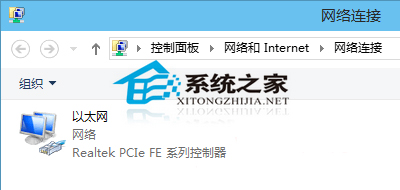
  1. 開啟「網路連線」 (控制台 → 網路與網際網路 → 網路連線,或 Win+R 輸入 ncpa.cpl)。
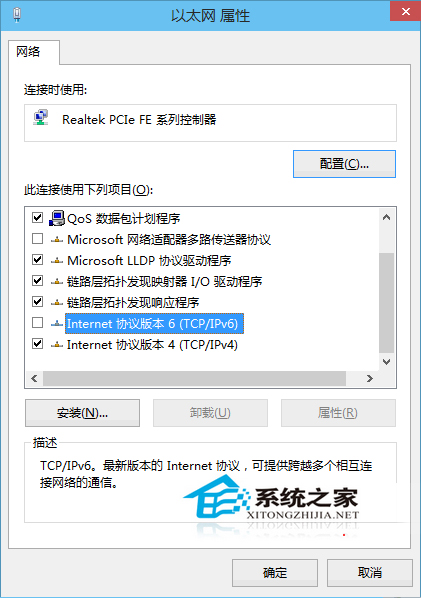
  2. 右鍵當前使用的網路介面卡 (乙太網路/Wi-Fi) → 「內容」。
  3. 在「此連線使用下列項目」清單中,找到「Internet 通訊協定第 6 版 (TCP/IPv6)」。
  4. 取消勾選 → 「確定」。

網路連線視窗

網卡內容 取消勾選 IPv6

補充知識:IPv6 (Internet Protocol Version 6) 為下世代網路協定,位址空間 128-bit,解決 IPv4 位址耗盡。但台灣/大陸 ISP 普及度仍低,多數家庭/企業環境純 IPv4。關閉 IPv6 後,若未來環境支援 IPv6,同樣路徑勾選即可重新啟用。


Copyright © Windows教程網 All Rights Reserved