Windows Update 下載安裝失敗時,殘留補丁檔案佔用空間且可能導致後續更新異常,手動刪除快取資料夾可重置更新狀態。
Windows\SoftwareDistribution\Download。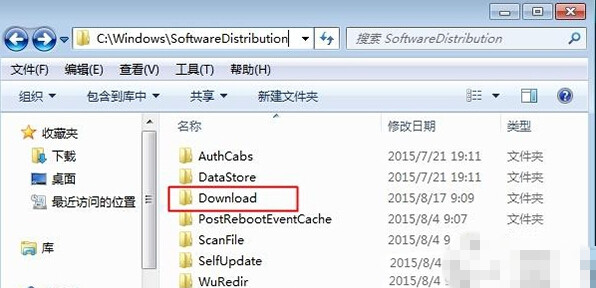
若單純刪除快取無效,可依序執行以下指令(管理員 CMD):
net stop wuauserv
net stop bits
ren C:\Windows\SoftwareDistribution SoftwareDistribution.old
net start wuauserv
net start bits
此法重建完整 SoftwareDistribution 資料夾,徹底重置更新元件。
Windows 10 關閉 Cortana 搜尋網頁內容提示設定教學
Win10 Build 10056 圖示優化曝光:回收站、虛擬桌面、開始選單微調
Win10 設定桌面背景自動輪播:個人化設定選擇「投影片播放」指定資料夾與間隔
Win10 安裝開發工具完整流程:加入 Insider、升級最新預覽版、安裝 Visual Studio 2015 CTP6 + Windows 10 SDK
Win10 Build 10147 畫廊大量洩露:Edge 品牌正式啟用、平板模式新導航、深色主題普及、動作中心新增靜音時段
Win10 如何設定鎖定畫面播放幻燈片?個人化設定加入資料夾循環顯示照片