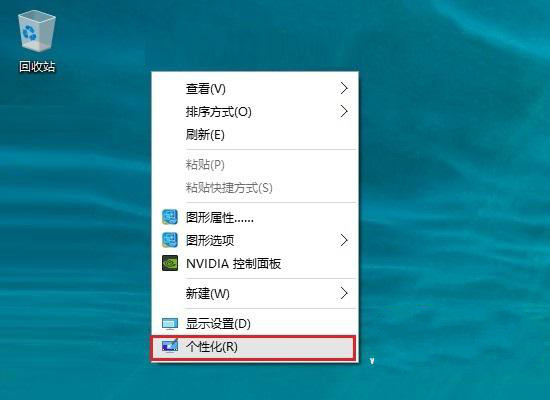
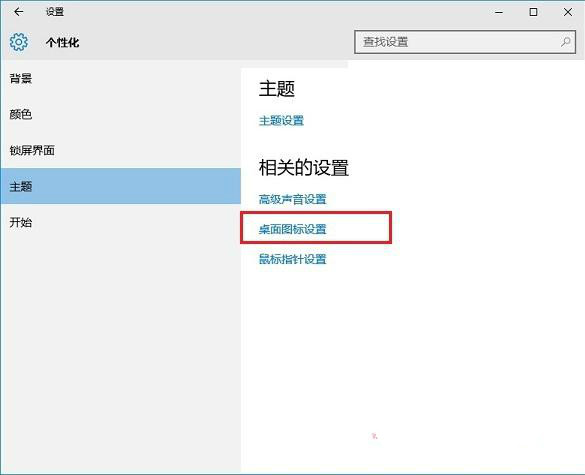
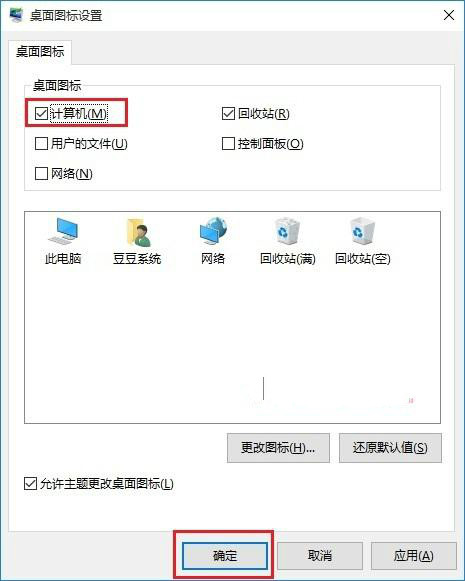
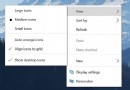
重裝 Win10 後發現桌面只剩「資源回收筒」,「這台電腦」等圖示消失。這並非系統錯誤,僅是預設未勾選。請依下列步驟恢復:
回到桌面即可看到所有圖示恢復正常。
安裝 Win 10 前必知 9 大常識:金鑰、語言、過期、虛擬機、配置、更新、下載來源、檔案保留、多系統
Windows 10 設定螢幕保護程式教學 (含 3D 管道、相片、字幕等內建項目)
Windows 10 技術預覽版停用自動更新的方法
Win10 U盤啟動盤制作教程:大白菜工具 ISO 模式 8GB+ U盤全流程
Win 10 帳戶被停用無法進入桌面?進入安全模式啟用帳戶解鎖
Win10 登錄編輯器新功能:右鍵「前往」快速跳轉同名鍵值
Win10 禁止自動更新驅動程序避免黑屏/藍屏:設備安裝設置→從不安裝 Windows Update 驅動
Windows 10 多帳戶快速切換登入教學