在不同子網路間實現 PXE 自動安裝 Ubuntu 10.04,核心在於跨網段路由與 DHCP/TFTP 協同設定。
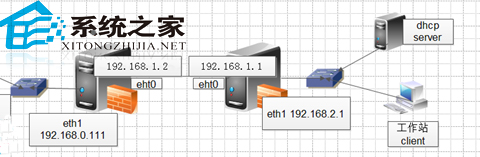
next-server (TFTP) 與 option routers (跨網段閘道)。pxelinux.0、核心與 ks.cfg (Kickstart),最終從 PXE Server (192.168.0.105) 拉取安裝源。# dhcpd.conf (客戶端網段)
subnet 192.168.2.0 netmask 255.255.255.0 {
range 192.168.2.100 192.168.2.200;
option routers 192.168.2.1; # 客戶端閘道
next-server 192.168.0.105; # TFTP/PXE Server
filename "pxelinux.0";
}
# PXE Server 閘道指向 192.168.0.111
route add default gw 192.168.1.1
# 客戶端網段閘道指向 192.168.2.1
route add default gw 192.168.1.2
測試客戶端獲 IP 192.168.2.101,成功透過 TFTP 192.168.0.105 啟動安裝。步驟雖少但需嚴格執行,確保跨網段路由暢通。