Edge 播放影片出現綠畫面、聲音正常但畫面異常,主因為顯卡驅動不相容或 Flash Player 硬體加速衝突。
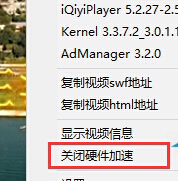

Adobe Flash Player 已於 2020/12/31 終止支援,現代網站多改用 HTML5 播放器。若仍遇綠畫面,優先檢查顯卡驅動與瀏覽器硬體加速設定 (Edge 設定→系統→關閉「可用時使用硬體加速」)。
Win10 檔案分享設定教學:特定使用者、Everyone、權限等級完整步驟
Windows 10 Build 10061 鎖定畫面黑畫面解決方案:官方修補程式 KB3055415 與暫時繞過登入法
Win10 設定指紋登入 (Windows Hello) 完整圖文教學
Win10 開機黑屏 30 秒進入系統?WinRE 進階修復禁用獨顯/低解析度模式啟動排查指南
Windows 10 應用商店下載的應用如何解除安裝?兩種方法:開始菜單與設定應用程式
Win10 Mobile 10559 何時推送?內部版本已進入 Fast Ring,10 月發布會有望亮相
Win10 右鍵選單新增「加密」快速加密檔案/資料夾:登錄表 EncryptionContextMenu=1 一鍵啟用 EFS