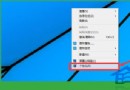
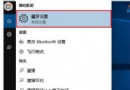
Win10 檔案總管預設不顯示圖片詳細資訊,實際上支援豐富欄位,操作如下:
即可在清單中直接查看各項屬性,無需開啟屬性視窗,管理照片素材更高效。
Win10 驅動程式下載安裝技巧:使用驅動人生一鍵更新
Win10 如何批次重新命名檔案?選取多檔 → 右鍵「重新命名」自動編號
Win10 啟動 IE 瀏覽器的兩大方法
Win10 安裝 KB3105208 更新藍屏死機官方臨時解決方案
Win10 如何輸入數學公式?內建數學輸入面板支援手寫辨識
Win10 Build 10163 更新日誌曝光:修復回滾 Win8.1 黑屏凍結、保留自訂電源計畫
Win10 滑鼠無法喚出右側邊欄?改用 Win+C 快速鍵開啟
Win10 「照片」App 磚狀圖示顯示模式切換:最近照片 vs 單張照片