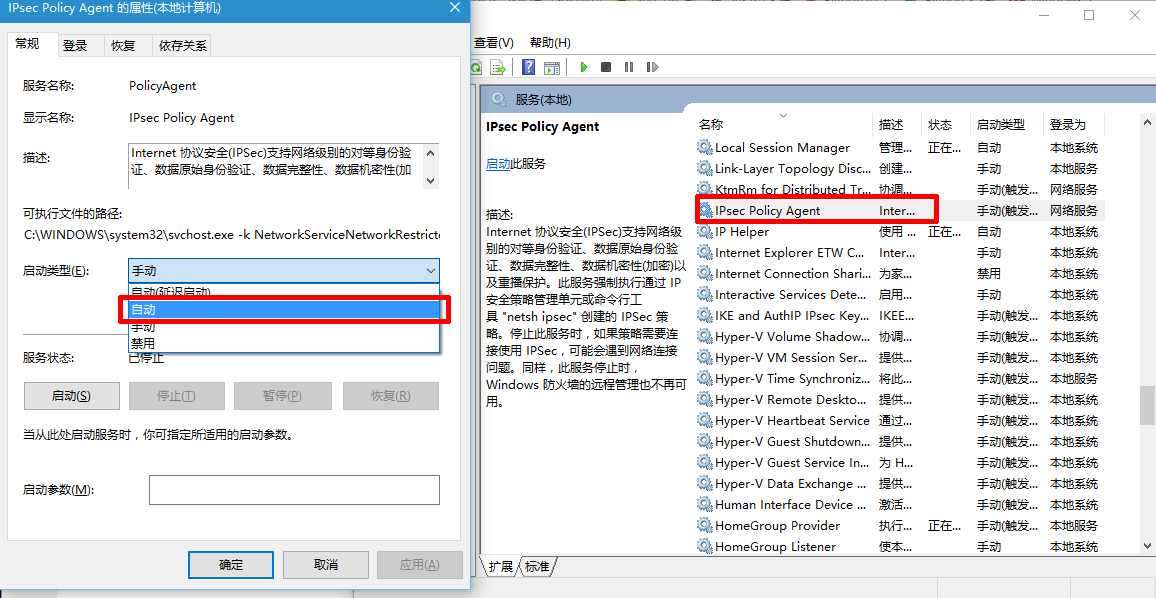
Windows 10 的 PIN 碼登入功能依賴特定系統服務運作。若 PIN 碼突然失效、無法設定或驗證失敗,通常是因為「IPsec Policy Agent」服務未啟動。透過簡單三步驟即可恢復正常。
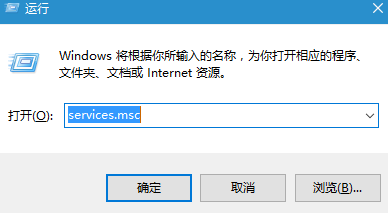
services.msc
設定完成後,建議重新開機或登出再登入,PIN 碼功能即可恢復正常使用。若仍異常,請檢查「IKE and AuthIP IPsec Keying Modules」服務是否同樣設為自動並已啟動。
VAIO 升級 Win10 官方支援機型列表與時程:索尼建議暫緩升級等驅動就緒
Win10 設定 5.1 環繞聲道完整圖文教程
Win10 如何關閉虛擬記憶體 (分頁檔)
Win10 工作列自動隱藏怎麼取消?任務列屬性一鍵固定顯示
Windows 10 如何禁止應用程式在背景執行?兩種方法輕鬆管理
Win10 刪除的檔案如何找回?註冊表修復回收站教學
Win10 移除捷徑小箭頭與「捷徑」文字註冊表教學
Win10 設定永不睡眠/待機:讓下載、渲染等長時間任務不中斷