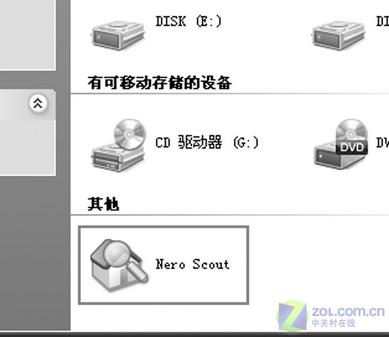
預設安裝 Nero 7 後,「我的電腦」會出現醒目「Nero Scout」圖示。經研究毫無實用價值且礙眼。卸載重裝用自訂安裝也無法解決。
「開始」→「執行」輸入:
regsvr32 /u "C:\Program Files\Common Files\Ahead\Lib\MediaLibraryNSE.dll"
點「確定」→ 重開「我的電腦」→ 圖示消失,乾乾淨淨。
原理: Nero Scout 是 Nero 7 新增的媒體資料庫元件,取消註冊其 Shell 命名空間擴充套件即可移除圖示。
一鍵還原 5.0 完成後提示「按任意鍵重啟」無反應?檢查 Pause 鍵卡住或多按 Enter
十大輸入法隱藏功能讓你打字飛快
Ctrl+Shift 無法切換輸入法?勾選「切換鍵盤配置」並設為 Ctrl 鍵即可恢復
魯大師 vs 超級兔子 vs 優化大師:三大系統優化工具深度横向評測與選購建議
音樂符號輸入大全:搜狗/百度/智能ABC/復制粘貼四種方法速查
五筆打字末筆字型交叉識別碼詳解:規則、編碼實例與速查表
Cain 無法啟動報錯 0xc0000022 解決:替換 npptools.dll 修復
VMware Workstation安裝XP虛擬機圖文教程:從創建到系統部署全流程