經典抓包神器 Cain 啟動失敗一鍵修復
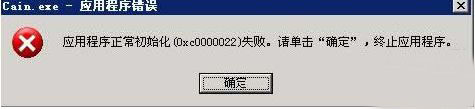
Cain & Abel 安裝後啟動報 **「應用程序初始化失敗 (0xc0000022)」**,並非中毒/殺毒誤殺,而是系統關鍵 DLL **`npptools.dll` 被替換/損壞/權限錯誤** (亦可能涉及 `WinPcap` 相關 DLL)。替換正確版本即可修復。
故障現象
- 雙擊 `Cain.exe` 彈窗:`The application failed to initialize properly (0xc0000022). Click OK to terminate.`
- 事件查看器/依賴檢測工具 (Dependency Walker) 顯示 `npptools.dll` 載入失敗/版本不匹配/存取拒絕。
修復步驟 (按順序,前者成功率最高)
- 獲取正確 `npptools.dll`:
- 從**同版本/同架構 (x86/x64) 乾淨 Windows 系統** `C:\Windows\System32\` 複製。
- 或從可信 DLL 下載站 (如 `dll-files.com`) 下載對應版本 (謹慎,風險自負)。
- 若有 `C:\Windows\System32\dllcache\` (舊系統) 同名檔,**先替換 dllcache 再替換 System32**。
- 替換檔案 (需管理員權限/TrustedInstaller 權限):
- 同步檢查 WinPcap 依賴 (Cain 抓包核心):
- 確保以下檔案存在且版本正確 (在 `System32` 或 Cain 目錄):
- `Packet.dll`
- `WanPacket.dll`
- `wpcap.dll`
- `pthreadVC.dll`
- `npf.sys` (驅動,`C:\Windows\System32\drivers\`)
- 若缺失/損壞 → 重新安裝 **WinPcap 4.1.3** (經典版) 或 **Npcap** (現代維護分支,支援 Win10/11/回環抓包)。
- 驗證: 雙擊 `Cain.exe`,熟悉介面出現 → 修復成功。
根因分析
- 系統優化/清理工具 (如優化大師、360 清理) **誤判 `npptools.dll` 為無用/風險檔而替換/刪除**。
- 安全策略/組策略限制 DLL 載入權限 (導致 0xc0000022 存取拒絕)。
- WinPcap/Npcap 安裝不完整/版本衝突 (常見於系統大版本升級後)。
現代替代建議
Cain 早已停更 (最後版 2011),僅支援舊協議/32 位。現代網絡分析建議:
- Wireshark (跨平台、開源、協議解析最強、Lua 腳本擴展、持續更新)。
- Npcap (WinPcap 現代替代者,Wireshark Windows 版內建依賴)。
- Fiddler / Charles (HTTP/HTTPS 應用層調試)。
修復 Cain 可延續舊項目/教學需求,但新專案請直接投入 Wireshark 懷抱。