Windows XP Windows 7 Windows 2003 Windows Vista Windows 綜合教學 Linux 系統教學
Windows 10 Windows 8 Windows 2008 Windows NT Windows Server 電腦軟體教學
您现在的位置: Windows教程網 >> Windows教程 >  >> 電腦軟體教學 >> 系統工具

EasyBoot 安裝與介面操作入門指南

編輯:系統工具

EasyBoot 安裝與基本操作

安裝步驟

  1. 執行 ezb4_cn.exe,預設安裝目錄為 C:\EasyBoot,亦可自行指定。
  2. 安裝程式自動建立以下目錄:
    • C:\EasyBoot\disk1:開機光碟系統檔案目錄
    • C:\EasyBoot\disk1\ezboot:開機選單檔案目錄
    • C:\EasyBoot\iso:輸出 ISO 檔案目錄

啟動程式

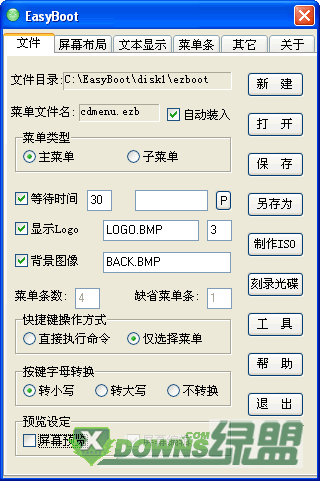
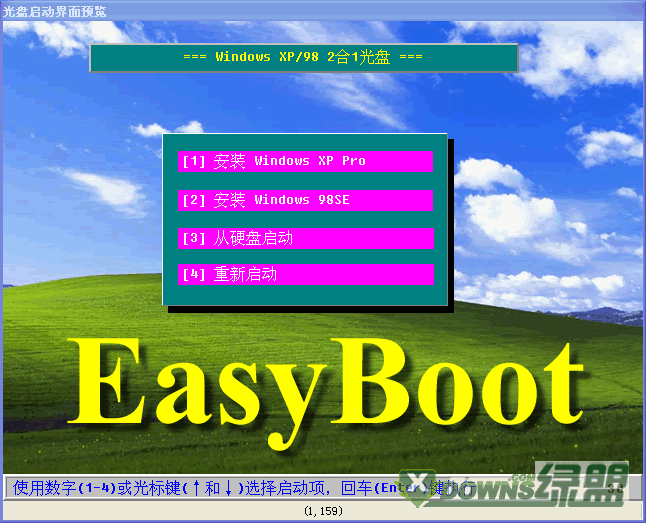
從「開始」→「程式集」→「EasyBoot」→「EasyBoot」啟動。介面包含兩個視窗:左側為「控制面板」,右側為「預覽視窗」。
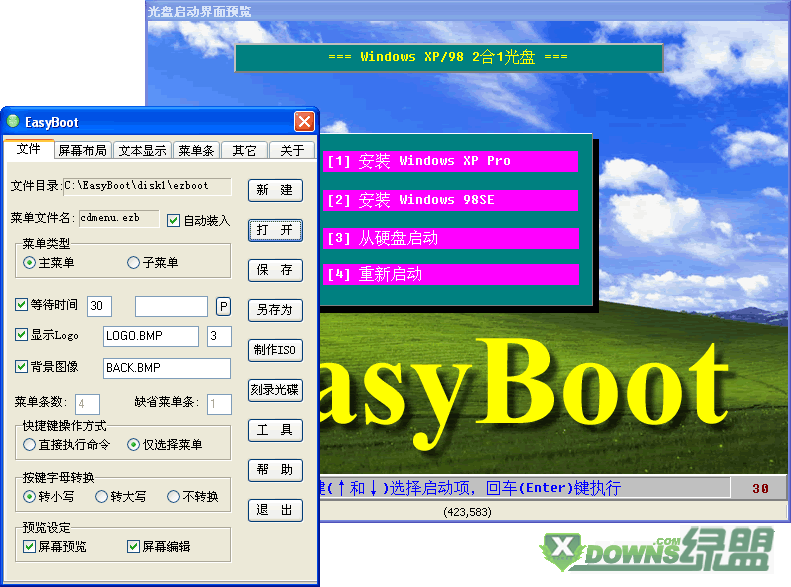
EasyBoot 主介面

控制面板

用於開啟/儲存選單檔、製作 ISO、修改螢幕物件位置、顏色屬性等。

控制面板詳細介面

預覽視窗

即時顯示實際光碟開機選單效果,亦可使用滑鼠/鍵盤進行編輯。

預覽視窗介面

Copyright © Windows教程網 All Rights Reserved