FlashGet 兩處密碼(站點資源探索器、Proxy 伺服器)以星號遮蔽,雖安全但不便查看分享。使用漢化工具 eXeScope 修改執行檔資源,可移除密碼遮罩屬性,達到明文顯示。
前置準備
- 下載 eXeScope:官方下載頁
- 先關閉 FlashGet,否則修改會報錯。
1. 站點資源探索器密碼明文化
- eXeScope 開啟
FlashGet.exe。
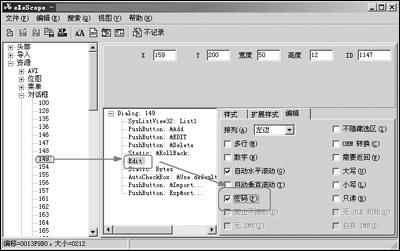
- 展開「資源 → 對話框 → 128」。
- 右側選中「Edit」控制項 → 「編輯」標籤 → 勾選「密碼」項 → 存檔離開。
2. Proxy 伺服器密碼明文化
- 同樣開啟
FlashGet.exe。
- 展開「資源 → 對話框 → 149」。
- 右側選中「Edit」 → 「編輯」標籤 → 勾選「密碼」 → 存檔。
效果
重新啟動 FlashGet,上述兩處密碼輸入框將以明文顯示,方便查看、備份與分享。