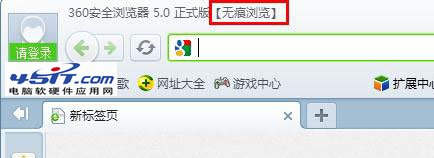
360 安全瀏覽器無痕瀏覽:關閉視窗後歷程、暫存檔、網址記錄、恢復列表全不保留,保護隱私。
標題列後綴與網址列前方按鈕會顯示無痕模式圖示。
適合公用電腦或不想留下痕跡的瀏覽場景。
IE9 無法輸入網銀密碼?安裝安全控件、加入信任網站兩步搞定
支付寶臉部辨識支付怎麼用?掃臉付款流程體驗
Foxmail 修改附件竟引發一波三折:關閉郵件後再改附件會觸發「另存為」而非直接保存
比特幣是什麼?從挖礦原理到交易運作完整解析
i酷加速器安裝與使用圖文教程:優酷視頻加速、斷點續播、共享目錄設定
Firefox 常用快捷鍵精選:強制重新整理、標籤管理、縮放、隱私模式一鍵達陣
換手機號後飛信如何遷移?官網個人中心操作指南與好友/增值業務合併規則
新浪微博關鍵詞屏蔽神器:「眼不見心不煩」腳本安裝與配置教程