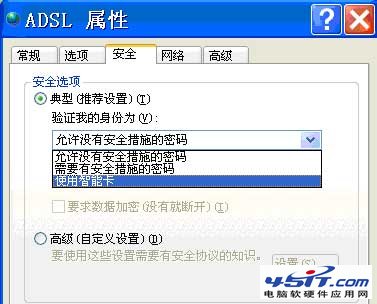
登入網銀即彈出「請插入 GemGPK 智慧卡」,通常是工行 U 盾驅動異常或 ADSL 撥號設定誤勾選「使用智慧卡」。
圖:GemGPK 智慧卡提示畫面
更多詳情請參考《「啟動瀏覽器時提示請插入 GemGPK 智慧卡」的解決》。
Firefox 五大實用技巧:找回書籤、無右鍵存圖、修改下載路徑、自動關閉下載管理器、自動清除快取
無法開啟 IE/點擊連結無反應?批次檔重新註冊 system32 下所有 DLL/OCX 修復
快的打車積分有什麼用?積分商城兌換實物/優惠券詳解
新浪微博關注失敗/系統繁忙?兩大原因與解決方案
Outlook 郵件圖片無法顯示?註冊表 OutlookSecureTempFolder 路徑失效修復指南
微信共享即時位置功能教學:雙向定位+語音對講,尋人約會神器
MSN Shell 3.1 外掛:在 MSN 聊天視窗直接看電視/聽廣播
YY 語音新手圖文教程:下載、登入、改名、麥克風調節、放歌、進頻道全流程