Windows XP Windows 7 Windows 2003 Windows Vista Windows 綜合教學 Linux 系統教學
Windows 10 Windows 8 Windows 2008 Windows NT Windows Server 電腦軟體教學
您现在的位置: Windows教程網 >> Windows教程 >  >> 電腦軟體教學 >> 影像與多媒體

暴風影音截圖全攻略:預設熱鍵 F5、自訂快捷鍵、儲存路徑與格式設定

編輯:影像與多媒體

暴風影音各版本均內建截圖功能,新版預設熱鍵 F5。若無效請依下列步驟查詢/自訂:

查看與自訂熱鍵

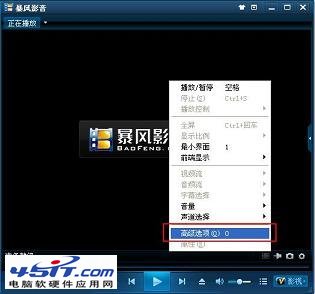
  1. 播放視窗右鍵 → 「高級選項」 → 「熱鍵」。
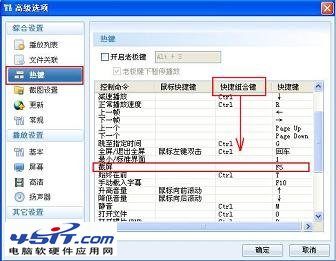
  2. 捲動列表找「截圖」,查看當前快捷鍵。
    熱鍵設定
    截圖熱鍵
  3. 自訂:在「快捷組合鍵」下拉選單選擇 Alt/Ctrl/Shift 等組合 → 確定。

截圖儲存路徑與格式修改

  1. 預設路徑:C:\Documents and Settings\用戶名\My Documents\My Pictures。
  2. 播放區右鍵 → 「高級選項」 → 「截圖設定」 → 修改「儲存路徑」與「格式」(BMP/JPG)。
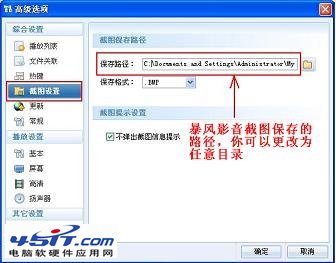
    截圖設定

設定完成後播放視頻按熱鍵即可快速截圖,資料管理更井井有條!

Copyright © Windows教程網 All Rights Reserved