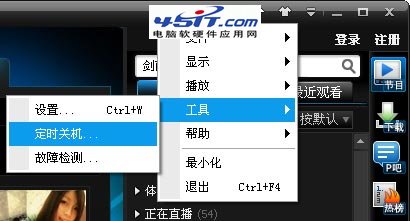
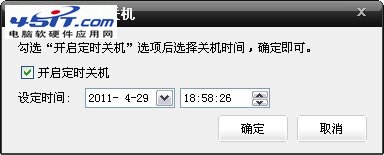
PPTV 內置定時關機功能,觀影入睡不擔心電腦整夜開機:
到達設定時間,PPTV 將自動觸發系統關機命令。
徹底禁止快播自動升級安裝:金山衛士權限封鎖法實測有效
MSN 安全必備:一鍵舉報好友帳號被盜,淨化網絡環境
酷狗 KuGoo 常見問題 32 題完整解答:下載、歌詞、共享、設定全攻略
電驢未連線伺服器解決:手動連線、開啟伺服器欄、首次執行嚮導、端口設 4661 提升高 ID 連線速度
風行點播初始化失敗?五大原因與針對性解決方案
美圖秀秀祛斑磨皮教學:一分鐘還原零瑕美肌,告別黑眼圈暗沉
CAJ 文件直接複製文字:CAJViewer 選擇文本工具免轉 Word
酷狗搜尋歌曲逾時解決方案:連接埠修改、防火牆放行、代理設定、替代客戶端