Windows XP Windows 7 Windows 2003 Windows Vista Windows 綜合教學 Linux 系統教學
Windows 10 Windows 8 Windows 2008 Windows NT Windows Server 電腦軟體教學
您现在的位置: Windows教程網 >> Windows教程 >  >> 電腦軟體教學 >> 電腦軟體介紹

PPT 轉 Word 講義教學:PowerPoint 內建「建立講義」功能

編輯:電腦軟體介紹

PowerPoint 內建「發佈」→「使用 Microsoft Office Word 建立講義」功能,可將簡報內容與備註自動轉為 Word 文件,方便列印發放或二次編輯。

操作步驟

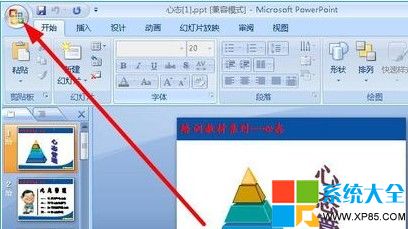
  1. 開啟 PPT 檔案,點擊左上角「Office 按鈕」(或「檔案」分頁)。
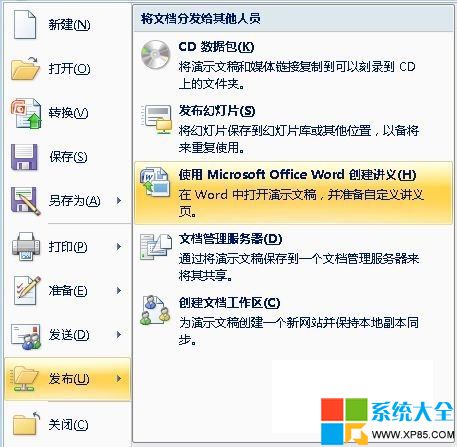
  2. 選擇「發佈」→「使用 Microsoft Office Word 建立講義」。
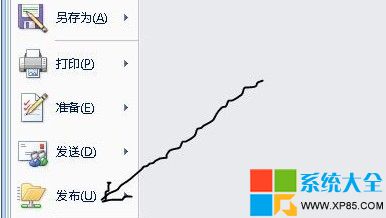
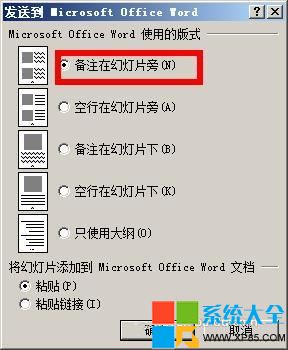
  3. 在彈出對話框選擇「講義旁的備註」,點擊「確定」。


  4. 系統自動啟動 Word 並產生講義文件,每頁包含投影片縮圖與對應備註。

產生的 Word 檔可自由編輯排版、調整字型、加入頁碼浮水印等,極適合會議講義製作。

Copyright © Windows教程網 All Rights Reserved