需在試算表批量產生條碼?Excel 內建 ActiveX 控制項 Microsoft Barcode Control 9.0 即可直接在工作表插入、修改條碼,免安裝額外軟體,資料聯動極便利。
啟用與插入步驟
- 確認電腦已安裝 Microsoft Barcode Control 9.0(Office 完整安裝通常內含)。
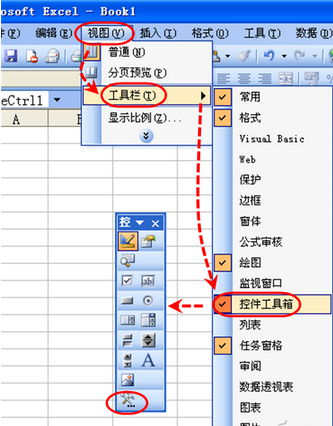
- Excel → 「檢視」→「工具列」→「控制項工具箱」→ 點擊「其他控制項」圖示(扳手錘圖示)。
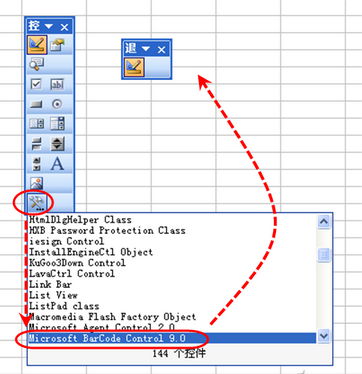
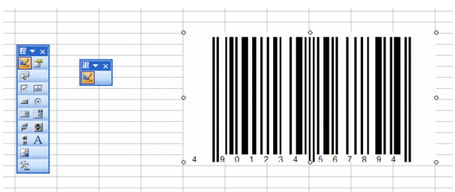
- 清單中選擇 Microsoft Barcode Control 9.0 → 滑鼠在工作表拖曳繪製條碼區塊。
修改條碼資料
- 右鍵條碼 → 「屬性」。
- 屬性視窗中修改 Value 值(輸入欲編碼的數字/字串)。
- 儲存工作表 → 重新開啟即見更新後條碼。
進階應用:搭配 VBA 讀取儲存格數值自動寫入 Value,實現批量依資料產生條碼。條碼類型(Code 39/128/EAN-13 等)可在屬性中切換。