Windows XP Windows 7 Windows 2003 Windows Vista Windows 綜合教學 Linux 系統教學
Windows 10 Windows 8 Windows 2008 Windows NT Windows Server 電腦軟體教學
您现在的位置: Windows教程網 >> Windows教程 >  >> 電腦軟體教學 >> 電腦軟體介紹

FineReport 報表日期自動計算年齡:公式 year(now())-year(出生日期)+1 實現無需資料庫欄位

編輯:電腦軟體介紹

報表需顯示年齡但資料庫無年齡欄位?FineReport 單元格公式直接計算:=year(now())-year(E5)+1,當年減出生年再加 1,即得虛歲。
實作流程

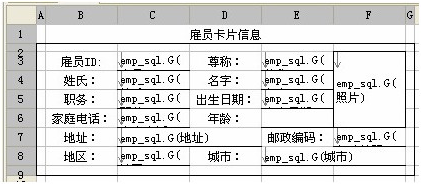
  1. 設計報表框架,配置欄位。
  2. 報表框架設計
  3. 年齡欄位儲存格(如 E6)輸入公式:=year(now())-year(E5)+1,E5 為出生日期欄位。
  4. 報表成品示意
  5. 儲存為 %FineReport_HOME%/WebReport/WEB-INF/reportlets/com/doc/form/5.3.cpt。
  6. 啟動報表伺服器,設計器右上角「填報預覽」或瀏覽器訪問:
    https://localhost:8075/WebReport/ReportServer?reportlet=com/doc/form/5.3.cpt&op=write

報表層面計算衍生欄位,資料庫結構零變更,維護極簡。

Copyright © Windows教程網 All Rights Reserved