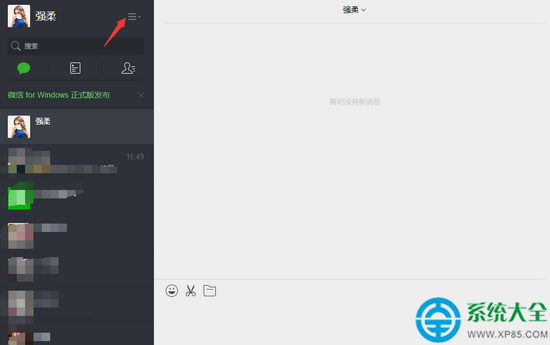
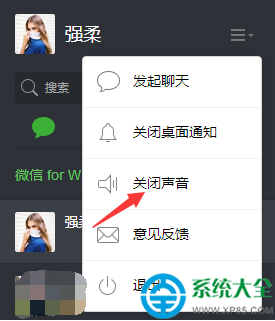
微信網頁版登入後,右上角頭像旁選單即可關閉聲音:
辦公環境必備小技巧,專注工作不被打擾。
Lumion 2.5 破解安裝教學:補丁替換法與隱藏檔案顯示設定
《喪屍圍城1》全 BOSS 打法大全:白衣男/吉普車三兄弟/超市變態男/小丑/機車女/追擊槍三父子/戲院老頭/二戰白衣男/胖女警/屠夫 10 大 BOSS 核心技巧
Foxmail 新增郵件帳號設定教學:支援 IMAP/POP3 手動配置
MyEclipse 自定義與更新完全指南:目錄、更新站點、dropins、組件裁剪
網易郵箱 App 手勢密碼啟用教學,守護隱私安全
360 驅動大師備份文件默認位置與自定義路徑設置指南
奇茹刷機完整刷機教學:ROOT、備份、刷 ROM 包、自動重啟全流程
極品五筆輸入法新手常見問題匯總:冷僻字、詞庫遷移、IE保護模式、協載方法