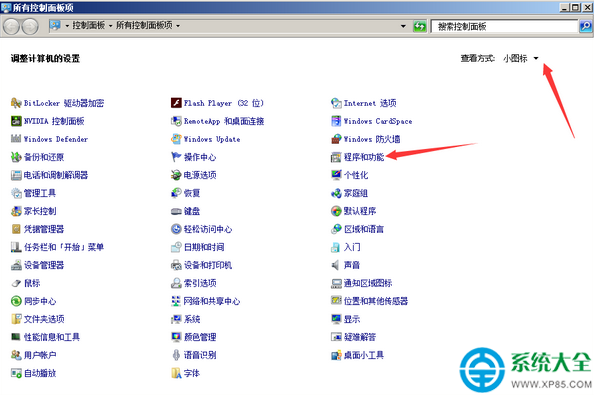
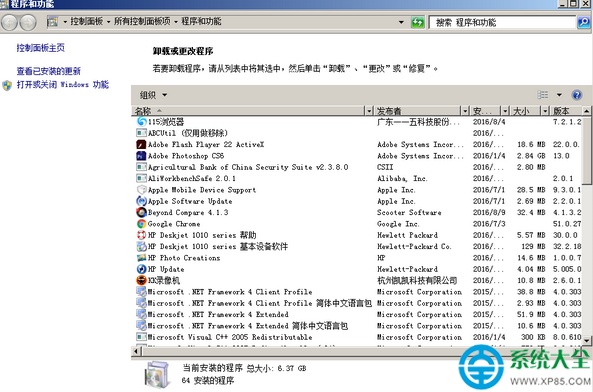
部分程式在執行中無法透過自身解除安裝程式移除,可使用 Windows 內建的「程式和功能」強制解除安裝。
若控制台仍無法移除,可嘗試第三方工具(如 Geek Uninstaller、Revo Uninstaller)掃描殘留檔案與登錄檔進行深度清除。
海豚網游加速器使用教學:遊戲選擇、分區節點、換膚、測速避坑指南
微軟如何破解 Win10 應用匱乏困局:跨平台開發工具戰略深度解析
2012 年筆記本顯晶片效能排行榜:高端、中高端、主流、入門四大梯隊完整版
魔獸世界戰網密保卡本月底全面自動解綁:升級登錄保護系統,異常登錄將鎖定通行證,建議綁定手機令/將軍令
QQ瀏覽器無法訪問銀行網站?切換 IE 相容模式即可解決
簡道雲家庭記帳系統搭建教學:分類管理、報表分析、微信記帳、家庭協作
Windows 主題破解通用補丁 UniversalThemePatcher 使用教學
天涯明月刀80級副本神武門全Boss打法詳解:機制應對與輸出節奏指南