Windows XP Windows 7 Windows 2003 Windows Vista Windows 綜合教學 Linux 系統教學
Windows 10 Windows 8 Windows 2008 Windows NT Windows Server 電腦軟體教學
您现在的位置: Windows教程網 >> Windows教程 >  >> 電腦軟體教學 >> 電腦軟體介紹

Windows 主題破解通用補丁 UniversalThemePatcher 使用教學

編輯:電腦軟體介紹

想在 Windows 套用第三方主題,必須先修補系統檔案移除簽名驗證。UniversalThemePatcher 是最常用的通用補丁工具,支援 Windows 7 / 8 / 10 / 11 的 32 位元與 64 位元版本。

確認系統位元數

  1. Win+R 輸入 cmd 開啟命令提示字元。
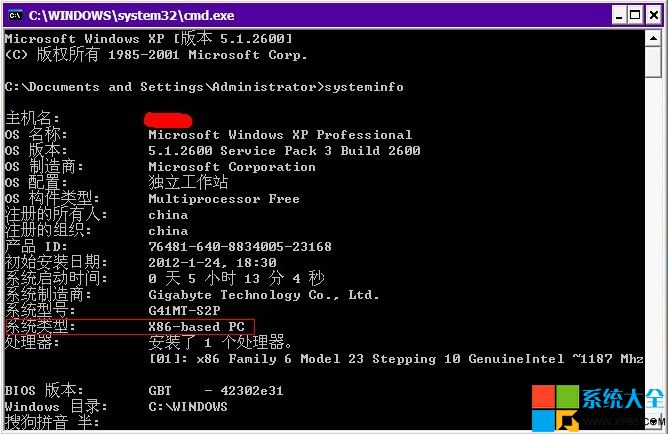
  2. 輸入 systeminfo 按 Enter。
  3. 找到「系統類型」:x86 為 32 位元,x64 為 64 位元。

破解步驟

  1. 依系統位元下載對應版本:
    • 32 位元:UniversalThemePatcher-x86.exe
    • 64 位元:UniversalThemePatcher-x64.exe
  2. 右鍵點選程式 → 以系統管理員身分執行(Win7/Vista/較新版本必須)。
  3. 介面上所有可點擊的 「Patch」/「破解」 按鈕全部點一下。
  4. 完成後 重新開機 即生效。

UniversalThemePatcher 介面

特別提醒

  • 部分 64 位元系統需同時執行 x64 與 x86 兩個版本才能完整破解。
  • 修補系統檔案有風險,建議先建立還原點或備份重要資料。
  • Windows 更新後可能會恢復原始檔案,需重新執行補丁。

下載連結:
32 位元主題破解工具(請點擊下載)
64 位元主題破解工具(請點擊下載)

Copyright © Windows教程網 All Rights Reserved