執行某些軟體時彈出「伺服器正在執行中」,提示「由於另一個程式正在執行中,此作業無法完成」,通常是 Background Intelligent Transfer Service (BITS) 服務衝突導致。解決方法:
services.msc 開啟服務管理員。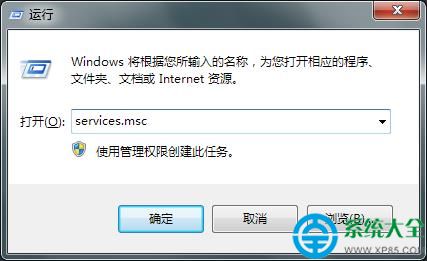
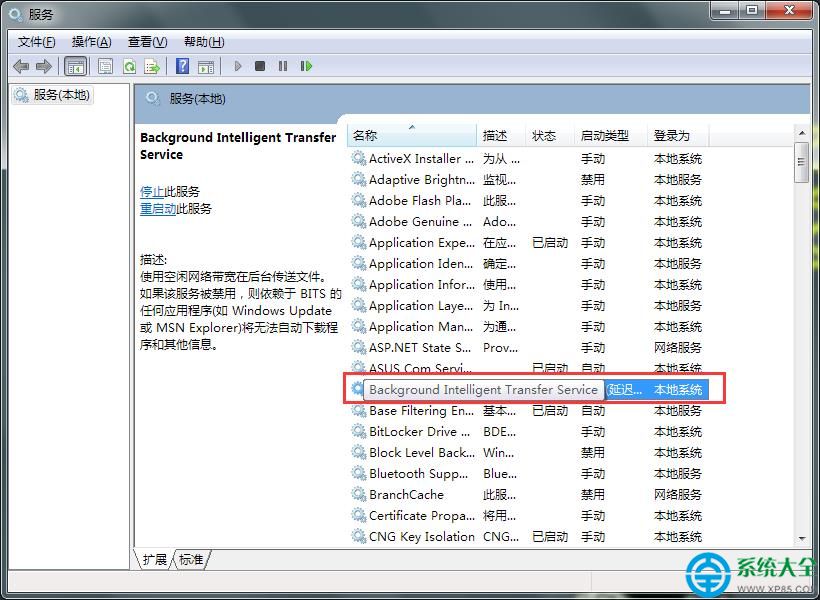
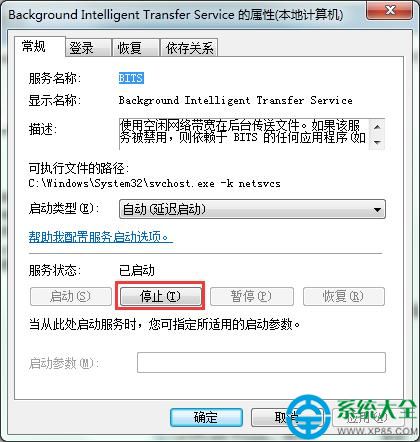
BITS 是 Windows Update 相依的關鍵服務,請勿設為「停用」,僅需暫時停止即可。停止後重新啟動有問題的軟體,錯誤訊息即可消失。
Windows 主題破解通用補丁 UniversalThemePatcher 使用教學
CF 9 月蘭的秘密基地:連登 3 天零元購極品道具,9 月 3-6 日限時開放
一鍵 Root 大師使用圖文教程:海量機型支援、高成功率、授權管理強力卸載預裝垃圾
俠客風雲傳神龍避毒珠(五毒珠)獲取攻略:藍婷滿好感贈送、修羅宮救鞏光傑高好感得
Word 2013 刪除空白頁四大法:Delete 鍵、普通檢視刪分頁符、尾頁 Backspace、取代分頁符批量清除
PPT 檔案過大怎麼辦?PPTminimizer 壓縮高達 98% 瘦身神器