軟體簡介
- 全球最流行 Web 伺服器,市佔率超 50%
- 快速、可靠、模組化擴展 (Perl/Python 可編譯內建)
- 完全免費、原始碼開放
- 適合每日百萬造訪量的高負載站點
- 1.3.17+ 版採 MSI 安裝包,Windows 下安裝如同 EXE 般便利
- Win98/NT 需先安裝「Microsoft Installer」才能執行 MSI
- 測試環境:Windows 2000
- 安裝前請停用/移除其他 HTTP 伺服器軟體
安裝步驟 (MSI 圖形化嚮導)
- 雙擊
.msi 啟動嚮導
- 「License Agreement」勾選「I accept...」→ Next
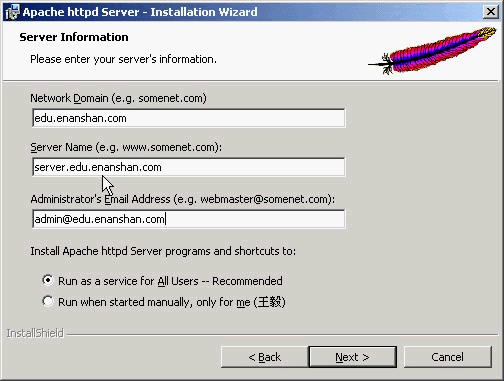
- 「Server Information」:域控制器自動填入網域名、伺服器名、管理員信箱;非域環境手動填寫。勾選「Run as a service for all Users」
- 「Setup Type」選「Complete」完全安裝
- 「Destination Folder」建議改為
C:\,系統將建立 C:\Apache
- 其餘預設 → 安裝完成 → 重啟電腦
服務驗證與管理
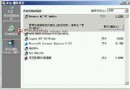
- 控制台 → 管理工具 → 服務 → 確認 Apache 服務狀態為「已啟動」
- 開始功能表 → Apache httpd Server → Configure/Control/Review Logs
- 瀏覽器輸入
https://server (伺服器名) 顯示預設首頁
核心配置檔 httpd.conf
位置:C:\Apache\conf\httpd.conf,用記事本編輯,**修改前務必多備份**,系統另提供 httpd.default.conf 為原始備份。
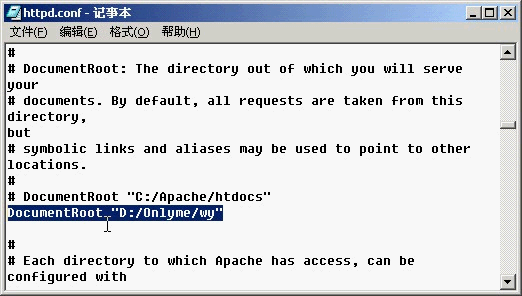
1. 變更網站根目錄 (DocumentRoot)
DocumentRoot "C:/Apache/htdocs"
↓ 修改為 ↓
DocumentRoot "D:/Onlyme/wy"
注意:路徑使用正斜線 /,尾部不加斜線。
2. 設定預設首頁 (DirectoryIndex)
DirectoryIndex index.html
↓ 新增自訂首頁 ↓
DirectoryIndex index.html index.htm index.php
各類型以空格分隔。
3. 修改生效必須重啟服務
開始功能表 → Apache httpd Server → Control Apache Server → Restart
移除 Apache
- 控制台 → 新增/移除程式 → 移除「Apache HTTP Server Version 1.3.20」
- 手動刪除
C:\Apache 完整目錄
安全建議
- 磁碟轉換 NTFS 格式
- 安裝官方安全修補程式
- 目錄權限最小化原則 (僅讀取/腳本執行)
- 定期檢查存取日誌